Search This Blog

Showing posts with label videos. Show all posts

Saturday, December 14, 2013

What does Devops mean and how to use it

We wrote before about the challenges a company will likely face when implementing devops. We provided a number of Devops good practices together with anti-pattern of how do and not to do things. We locked at the language people use when talking about Devops here and saw a practical example base on Rackspace Openstack to what challenges and problems the implementation can lead to here. Below is a nice video that help even better understand it. Happy devops watching ;).

DevOps movie


Interesting slides from the movie


References

Direct link to the video on YouTube http://www.youtube.com/watch?v=_I94-tJlovg&feature=em-uploademail
More Rackspace videos http://www.youtube.com/user/RackspaceHosting?feature=watch

Rackspace resources
http://developer.rackspace.com/blog/
http://www.rackspace.com/devops/
http://www.rackspace.com/blog/tag/devops/
http://www.rackspace.com/blog/accelerate-devops-adoption-for-faster-innovation/

Thursday, May 30, 2013

How to find a YouTube video on blogger.com

When you want to add a video to your blog post on http://www.blogger.com/ the search mechanism may not be able to find it on YouTube. For example try to search for string Cisco 1 - VXLAN and the Nexus 1000v with Han Yang.

Problem

How to add video from YouTube to your blog.

Solution
  • Add a random video from YouTube and copy the HTML code (example bellow)

    • <div class="separator" style="clear: both; text-align: center;"> <object width="320" height="266" class="BLOGGER-youtube-video" classid="clsid:D27CDB6E-AE6D-11cf-96B8-444553540000" codebase="http://download.macromedia.com/pub/shockwave/cabs/flash/swflash.cab#version=6,0,40,0" data-thumbnail-src="http://img.youtube.com/vi/lU1GXLSVQOk/0.jpg"><param name="movie" value="http://youtube.googleapis.com/v/lU1GXLSVQOk&source=uds" /><param name="bgcolor" value="#FFFFFF" /><param name="allowFullScreen" value="true" /><embed width="320" height="266" src="http://youtube.googleapis.com/v/lU1GXLSVQOk&source=uds" type="application/x-shockwave-flash" allowfullscreen="true"></embed></object></div>

  • Find your video id on YouTube 


  • Replace in the HTML code the 3 places with old id lU1GXLSVQOk with the new ID l4JCBq1aXKE

Sunday, November 18, 2012

How to extract captions from a youtube video

There are videos on youtube that are 30min and longer. You've watched a video and later on you would like to find only a single moment that is interesting for you. With a help of subtitles and key word searching we could easily do it.

Problem

How to download and search in Google text captions file from a youtube video.

Solution

There are couple of solution that can be found on Google in the referece section. All the automatic ways didn't work for me. Below is a manual method that I used to extract the subtitles (caption) file from a Google video.

  • Open a video page in Chrome browser. 
  • Enable debuging and reqeuest trucking by pressing F12 in Chrome.
  • Enable caption in the video. 
  • Navigate into the Network tab and find the last timedtext request (the last at the bottom)
  • Right click on it and open that file in a new tab; An xml file containing subtitles with the imestamps should be opened. 

References
  1. http://mvark.blogspot.in/2012/06/how-to-extract-subtitles-from-youtube.html
  2. http://stackoverflow.com/questions/10036796/how-to-extract-subtitles-from-youtube-videos
  3. http://webapps.stackexchange.com/questions/25072/how-do-i-download-subtitles-from-a-youtube-video
  4. http://www.youtube.com/watch?v=drTyNDRnyxs

Thursday, November 15, 2012

What network topologies can I build with Openstack Quantum server

The Folsom Openstack release brings many enhancements to networking stack in the Openstack version of the cloud. The features have been encapsulated with in a new core project called Quantum. But even looking at the documentation it can be very difficult at the beginning to understand what are the differences to old nova-network solution and how an example Quantum virtual network can be configured.

Fortunately there is an easy to follow video introduction to Quantum from last Summit [1]. The slides to it can be found here as well [2].

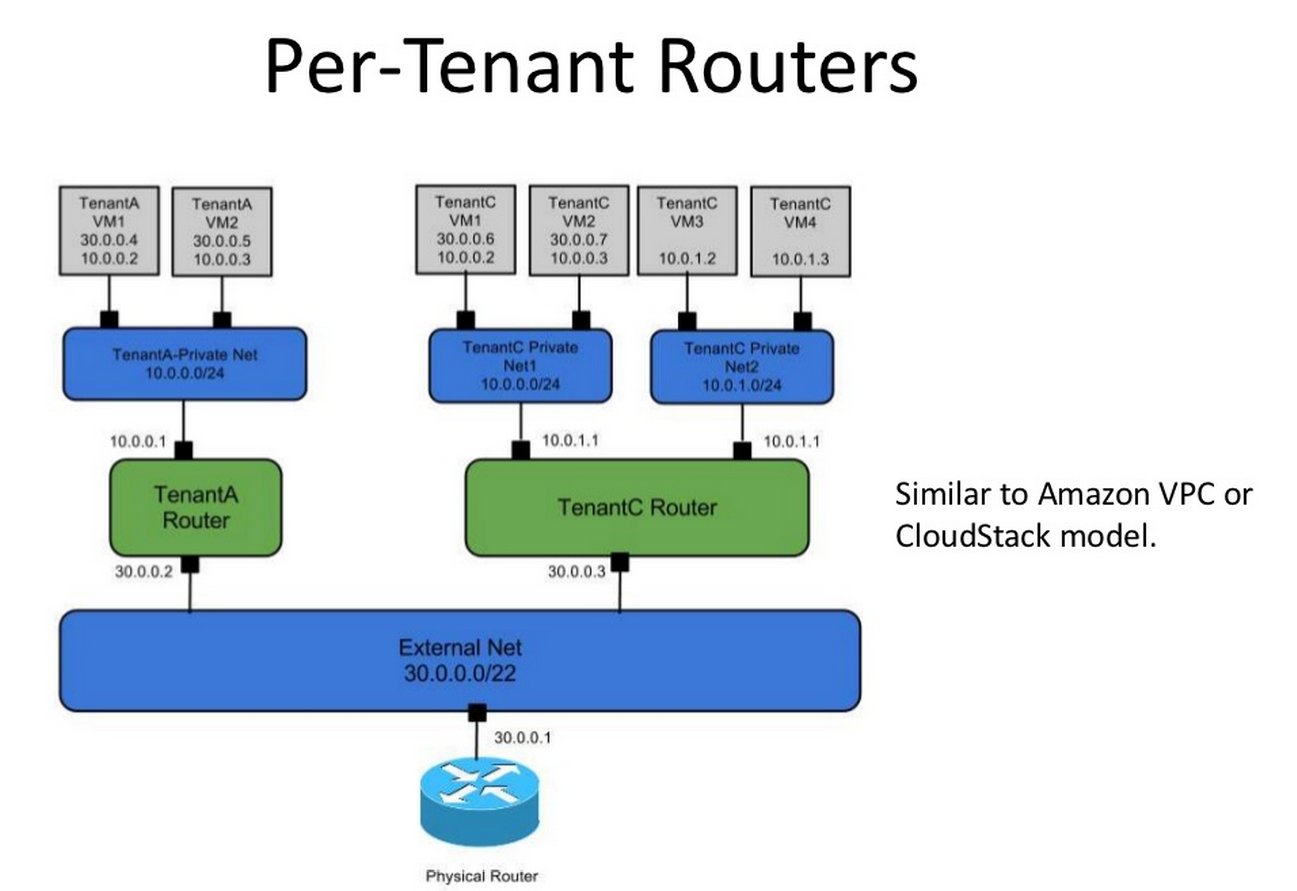
Below are example slides from the presentation of how a virtual network can be build and how it can look like in cloud powered by Openstack, examples: single flat network, multiple flat networks, mixed flat plus private networks, single provider network, multiple per tenant private networks plus single provider network.


References

  1. OpenStack Networking (Quantum) Project Update 
  2. http://www.slideshare.net/danwent/quantum-grizzly-summit 
  3. More slides about Quantum from Dan Wendlandt at slideshare

Wednesday, November 14, 2012

Videos from 2012 Openstack Summit in San Diego

Here you can find videos for these of us who couldn't participate in the 2012 Openstack Summit in San Diego:

At Openstack home page: Openstack summit sessions/
At Openstack chanell  on youtube: OpenStackFoundation