Search This Blog

Showing posts with label api. Show all posts

Sunday, April 27, 2014

You can use bash shell instead of Cisco CLI on Nexus Switches

Every one who works on Linux and understand how to efficiently use Bash hates to work with the limited Cisco IOS CLI. The design objectives standing behind this CLI haven't changed for the last 20 years or so. It is obvious that this tools lacks plenty of features expected from a modern shell for many people.

But the evolution or even revolution that is happening in networking thanks to SDN is changing this terrible static network configuration landscape. The new generation of network devises like Cisco Nexus platform are going to support in the Cisco NX-OS :
  • Bash shell
  • Python shell 
  • API access
  • Linux containers for custom applications
For these who still don't believe you can read about this here:

References

http://www.cisco.com/c/en/us/products/switches/nexus-9000-series-switches/white-paper-listing.html
http://rtomaszewski.blogspot.co.uk/search/label/sdn
http://rtomaszewski.blogspot.co.uk/2013/09/cisco-cheat-sheet.html

Saturday, March 29, 2014

How to write a plugin for Sublime editor

Below is a list of links for Sublime API and Sublime commands if you want to write a custom plugins.

Sublime API

https://www.sublimetext.com/docs/api-reference
https://www.sublimetext.com/docs/2/api_reference.html

Commands

http://sublimetext.info/docs/en/core/commands.html
http://www.sublimetext.com/docs/commands

Debug best practices

Once you follow the steps below everything you do in the editor will be logged on the console.
  • Open Sublime console: Ctrl+~
  • Enable verbose and debug within the editor
sublime.log_commands(True)
sublime.log_input(True)
  • Example commands to try on the console 
view.run_command("goto_line", {"line": 7})
view.window().run_command("show_minimap", {"key": True})


Tuesday, October 1, 2013

Sublime macro error

Macros are a very power full tools when working with text editors. If you repeatedly typing the same commands/characters to edit your text you can always try to capture them and save as a macro.

Problem

A macro that tries to capture the ALT+F3 keyboard shortcat to highly all the word occurrence in text (more about this here) doesn't work and is erroring out on the console with this message.
 
Unknown macro command find_all_under

Troubleshooting

You can reproduce this by trying these steps:
  • Create a new file with this content.
  •  
    Line : aaa
    comment1
    comment2
    comment3
    
    Line : bbb
    comment4
    comment5
    

  • Select menu tools -> record macro in sublime.
  • Highlight the ":" char and press ALT-F3 to mark two lines.
  • Stop macro and save it.
The file should look similar to this one:
 
[
 {
  "args":
  {
   "by": "characters",
   "extend": true,
   "forward": true
  },
  "command": "move"
 },
 {
  "args": null,
  "command": "find_all_under"
 }
]

When you try to execute this macro it doesn't work and you can see the error message in the console window.

Analysis and solution

The command find_all_under is documented and works fine. You can always try to run it manually from the console yourself.
 
view.window().run_command("find_all_under")

To create the automatic solution and let the editor to do the work for me I decided to write a Plugin using Sublime Python API. The code works perfectly fine and can be found on my github account: https://github.com/rtomaszewski/sublime under the file device_list.py. All what you need to do is to install this plugin and execute it manually or use a keyboard shortcat to trigger it.

Workaround example:
 
view.run_command("device_list")

References

Sublime Python API
http://www.sublimetext.com/docs/2/api_reference.html
http://docs.sublimetext.info/en/latest/reference/plugins.html

Commands
http://docs.sublimetext.info/en/latest/reference/commands.html
http://www.sublimetext.com/docs/commands
http://docs.sublimetext.info/en/latest/extensibility/commands.html

Debugging
http://www.sublimetext.com/forum/viewtopic.php?f=6&t=10106
http://sublimetext.userecho.com/topic/114638-ctrlshiftt-does-not-work/
http://www.sublimetext.com/forum/viewtopic.php?f=6&t=4961

Sunday, August 18, 2013

How to create a PTR DNS record on Rackspace Cloud

There is an easy way to create a PTR record on MyCloud portal. But with constant code upgrades and new changes on the portal the button sometimes don't work.


Problem

How to create a reverse DNS (PTR) record for a Rackspace cloud server using API.

Solution

This little script create a PTR records using Openstack Cloud API: dns-ptr-record.py.

Example

Example snippets from ipython console:
 
In [57]: rec = {'data': '162.13.2.xyz', 'name': 'yourservername.mydomain.com', 'type': 'PTR'}

In [62]: dns.add_ptr_records(a0,rec)
Out[62]:
[{u'created': u'2013-08-18T18:15:33.000+0000',
  u'data': u'162.13.2.xyz',
  u'id': u'PTR-579695',
  u'name': u'yourservername.mydomain.com',
  u'ttl': 3600,
  u'type': u'PTR',
  u'updated': u'2013-08-18T18:15:33.000+0000'}]

In [67]: dns.list_ptr_records(a0)
Out[67]: [<CloudDNSPTRRecord id=PTR-579695, data=162.13.2.xyz, name=yourservername.mydomain.com, ttl=3600>]

 
root@manage2:~# dig -x 162.13.2.xyz  @dns1.stabletransit.com

; <<>> DiG 9.8.1-P1 <<>> -x 162.13.2.xyz @dns1.stabletransit.com
;; global options: +cmd
;; Got answer:
;; ->>HEADER<<- opcode: QUERY, status: NOERROR, id: 12333
;; flags: qr aa rd; QUERY: 1, ANSWER: 1, AUTHORITY: 2, ADDITIONAL: 0
;; WARNING: recursion requested but not available

;; QUESTION SECTION:
;xyz.2.13.162.in-addr.arpa.     IN      PTR

;; ANSWER SECTION:
xyz.2.13.162.in-addr.arpa. 3600 IN      PTR     yourservername.mydomain.com.

;; AUTHORITY SECTION:
2.13.162.in-addr.arpa.  300     IN      NS      ns.rackspace.com.
2.13.162.in-addr.arpa.  300     IN      NS      ns2.rackspace.com.

;; Query time: 109 msec
;; SERVER: 69.20.95.4#53(69.20.95.4)
;; WHEN: Sun Aug 18 18:18:49 2013
;; MSG SIZE  rcvd: 130

References
  1. https://github.com/rackspace/pyrax/issues/79
  2. http://docs.rackspace.com/cdns/api/v1.0/cdns-devguide/content/ReverseDNS-123457003.html
  3. http://www.rackspace.com/knowledge_center/article/rackspace-cloud-essentials-6-creating-a-reverse-dns-record
  4. http://www.rackspace.com/knowledge_center/comment/155017


Monday, April 29, 2013

Challenge 11 script

The full summary of all posts for API Rackspace challenge can be found here:
Rackspace api-challenge summary

Challenge 11 script

Below is the output and results from script #11 from the api-challenge.

The script can be repeatedly run with the option -d otherwise it stops if any of the cloud objects it wants to create already exist.

    Challenge 11: Write an application that will: Create an SSL terminated load balancer 
    (Create self-signed certificate).
    Create a DNS record that should be pointed to the load balancer. Create Three servers 
    as nodes behind the LB.

    Each server should have a CBS volume attached to it. (Size and type are irrelevant.)
    All three servers should have a private Cloud Network shared between them.
    Login information to all three servers returned in a readable format as the result 
    of the script, including connection information. Worth 6 points


Depending on the obligatory -n options it will create cloud objects with predictable names.
Below is an example what objects it creates and what the naming conversion is.

# # python challenge11.py

    usage: challenge11.py [-h] [-v] [-d] [ -k key-key  ] [ -c cert ] [ -i image-id ][ -f flavor-id ] -n FQDN-name

    image-id -f flavor-id
        -h - usage help
        -v - verbose / debug output
        -d - delete objects if they existed in cloud before creating new one
        -k - certificate pritate key (see -c below)
        -c - public certificate ( see -k above)
        -n - FQDN name like www.myexample.com
        -i - specify image-id or use the default for Ubuntu 10.04
        -f - specify flavor-id or use the default for the smallest cloud server


# python challenge11.py -d -n www.challenge11.myrado.net

[01:04:17] Checked your cert/key pair www.challenge11.myrado.net.crt/www.challenge11.myrado.net.key, ok
[01:04:18] Deleting existing domain challenge11.myrado.net
[01:04:20] Checked your FQDN www.challenge11.myrado.net, ok
[01:04:20] Checked your DNS domains challenge11.myrado.net, there is none, ok
[01:04:26] Deleted existing cloud server www.challenge11.myrado.net-0
[01:04:29] Deleted existing cloud server www.challenge11.myrado.net-1
[01:04:33] Deleted existing cloud server www.challenge11.myrado.net-2
[01:04:33] Checked your existing cloud server www.challenge11.myrado.net-*, ok
[01:04:34] Checked your block images www.challenge11.myrado.net, there is none, ok
[01:04:36] Checked your lb www.challenge11.myrado.net, there is none, ok
[01:04:37] Checked your image id d4c7b93d-9f18-45dc-aa7c-3e3b126e3792, ok
[01:04:37] Checked your flavor id 2, ok
[01:04:38] Deleted existing network obj www.challenge11.myrado.net
[01:04:38] Checked your existing network objects www.challenge11.myrado.net, ok
[01:04:38] Checked your cert/key pair www.challenge11.myrado.net.crt/www.challenge11.myrado.net.key, ok
[01:04:39] Checked your FQDN www.challenge11.myrado.net, ok
[01:04:39] Checked your DNS domains challenge11.myrado.net, there is none, ok
[01:04:45] Deleted existing cloud server www.challenge11.myrado.net-1
[01:04:50] Deleted existing cloud server www.challenge11.myrado.net-2
[01:04:50] Checked your existing cloud server www.challenge11.myrado.net-*, ok
[01:04:50] Deleted existing block storage image  www.challenge11.myrado.net-0
[01:04:51] Deleted existing block storage image  www.challenge11.myrado.net-1
[01:04:51] Deleted existing block storage image  www.challenge11.myrado.net-2
[01:04:51] Checked your block images www.challenge11.myrado.net, there is none, ok
[01:05:04] Checked your image id d4c7b93d-9f18-45dc-aa7c-3e3b126e3792, ok
[01:05:04] Checked your flavor id 2, ok
[01:05:05] Checked your existing network objects www.challenge11.myrado.net, ok
[01:05:05] Building 3 cloud servers
.
.
.
.
[01:08:20] Building and configuring lb ...
.
.
.
.
.
.
.
[01:09:09] Building and configuring dns domain ...
[01:09:13] ----------------------------------------------------------------------
[01:09:13] vip name www.challenge11.myrado.net and ip 162.13.24.49
[01:09:13] cloud server www.challenge11.myrado.net-0 added to pool as 10.179.65.126
[01:09:13] cloud server www.challenge11.myrado.net-1 added to pool as 10.179.70.78
[01:09:13] cloud server www.challenge11.myrado.net-2 added to pool as 10.179.73.93
[01:09:13] ----------------------------------------------------------------------
Server # 0: ID 3227a512-3a1c-4f68-a82a-89d15ec74341 name www.challenge11.myrado.net-0 pub IP 95.138.173.80 priv IP 192.168.100.2 password SecretP@ss1
Server # 1: ID 662606f2-66a8-4281-8025-5161bf31754c name www.challenge11.myrado.net-1 pub IP 95.138.171.48 priv IP 192.168.100.1 password SecretP@ss1
Server # 2: ID f37d3551-60f5-40f3-92eb-4cbb1f7dbcfe name www.challenge11.myrado.net-2 pub IP 95.138.175.130 priv IP 192.168.100.3 password SecretP@ss1

References
  1. https://github.com/rtomaszewski/api-challenge/tree/challenge11
  2. http://docs.rackspace.com/loadbalancers/api/v1.0/clb-devguide/content/SSLTermination-d1e2479.html

Friday, April 26, 2013

Challenge 10 script

The full summary of all posts for API Rackspace challenge can be found here:
Rackspace api-challenge summary

Challenge 10 script

Below is the output and results from script #10 from the api-challenge.
The script shows more advance example how consume cloud resources like cloud servers, cloud load balances, cloud files and cloud dns. It does it by building a simple solution.

The script can be repeatedly run with the option -d otherwise it stops if any of the cloud objects it wants to create already exist.
Depending on the obligatory -n options it will create cloud objects with predictable names.
Below is an example what objects it creates and what the naming conversion is.

# python challenge10.py

    usage: challenge10.py [-h] [-v] [-d] [ -s ssh-key ] [ -e error-page ] [ -c container-name ] [ -i image-id ] [ -f flavor-id ] -n FQDN-name

    image-id -f flavor-id
        -h - usage help
        -v - verbose / debug output
        -d - delete objects if they existed in cloud before creating new one
        -n - FQDN name like www.myexample.com
        -s - path to your ssh public key (not priv!)
        -e - path to a html file that will be served from the LB when all pool members are down
        -c - name of cloud files container-name to store the backup data
        -i - specify image-id or use the default for Ubuntu 10.04
        -f - specify flavor-id or use the default for the smallest cloud server

# python challenge10.py -d -n www.challenge10.myrado.net
[22:50:46] Checked your ssh public key /root/.ssh/id_rsa.pub, ok
[22:50:46] Checked your error page error.html, ok
[22:50:50] Deleted existing cloud server www.challenge10.myrado.net-0
[22:50:54] Deleted existing cloud server www.challenge10.myrado.net-1
[22:50:54] Checked your existing cloud server www.challenge10.myrado.net-*, ok
[22:50:56] Deleting existing domain challenge10.myrado.net
[22:50:57] Checked your FQDN www.challenge10.myrado.net, ok
[22:50:57] Checked your DNS domains challenge10.myrado.net, there is none, ok
[22:50:57] Deleted container www.challenge10.myrado.net
[22:50:57] Checked your container www.challenge10.myrado.net where we are going to keep backup data, ok
[22:50:59] Checked your lb www.challenge10.myrado.net, there is none, ok
[22:51:01] Checked your image id d4c7b93d-9f18-45dc-aa7c-3e3b126e3792, ok
[22:51:01] Checked your flavor id 2, ok
[22:51:01] Building 2 cloud servers
.
.
.
.
[22:53:37] Building and configuring lb ...
.
.
.
.
[22:54:15] Building and configuring dns domain ...
[22:54:18] Backuping files to cloud files ...
[22:54:19] ----------------------------------------------------------------------
[22:54:19] vip name www.challenge10.myrado.net and ip 162.13.24.117
[22:54:19] cloud server www.challenge10.myrado.net-0 added to pool as 10.179.73.200
[22:54:19] cloud server www.challenge10.myrado.net-1 added to pool as 10.179.73.165
[22:54:19] Error page is stored in container www.challenge10.myrado.net under name error.html
[22:54:19] to check if the config works try to: curl -v http://162.13.24.117

These are some steps to verify the config.
 
# dig +short @69.20.95.4 www.challenge10.myrado.net
162.13.24.117

# nova list | grep challenge10                                                                          23:03:28
| 35e831a5-cfc8-44a7-98ff-1a003cc30901 | www.challenge10.myrado.net-0 | ACTIVE | public=2a00:1a48:7805:0113:8cfc:cf10:ff08:21ff, 95.138.174.137; private=10.179.73.200 |
| 06259b99-33d0-4537-94ab-e1be032337aa | www.challenge10.myrado.net-1 | ACTIVE | public=2a00:1a48:7805:0113:8cfc:cf10:ff08:3c44, 95.138.174.236; private=10.179.73.165 |

# curl -v http://162.13.24.117
* About to connect() to 162.13.24.117 port 80 (#0)
*   Trying 162.13.24.117... connected
> GET / HTTP/1.1
> User-Agent: curl/7.22.0 (x86_64-pc-linux-gnu) libcurl/7.22.0 OpenSSL/1.0.1 zlib/1.2.3.4 libidn/1.23 librtmp/2.3
> Host: 162.13.24.117
> Accept: */*
>
< HTTP/1.1 500 Internal Server Error
< Date: Thu, 25 Apr 2013 23:26:45 GMT
< Connection: close
< Content-Type: text/html
<                                                                                                                                   23:28:27
* Closing connection #0
<html>
  <head>
    <title>Challenge 10 - Default error page on LB</title>
  </head>
  <body> Sorry but all pool members failing health checks. </body>
</html>

References
  1. https://github.com/rtomaszewski/api-challenge/tree/challenge10

Wednesday, April 24, 2013

Challenge 9 script

The full summary of all posts for API Rackspace challenge can be found here:
Rackspace api-challenge summary

Challenge 9 script

Below is the output and results from script #9 from the api-challenge.
The script checks if the provided parameters are correct and doesn't collide with existing cloud objects.
First it creates cloud server. Once it is built it maps its public IP in DNS A record for new domain it created.
 
# python challenge9.py

    usage: challenge9.py [-h] [-v] -n FQDN-name -i image-id -f flavor-id
        -h - usage help
        -v - verbose / debug output
        -n - FQDN name
        -i - proper image id
        -f - flavor id

# python challenge9.py -n www.challenge9.myrado.net -i 88130782-11ec-4795-b85f-b55a297ba446 -f 2
[19:54:23] Creating new DNS zone challenge9.myrado.net
[19:54:24] Creating cloud server ...(please wait the build can take a while)
.
.
.
.
.
.
.
.
.
[19:59:34] DNS zone challenge9.myrado.net has been udpated and a new A record created
[19:59:34] rec A: www.challenge9.myrado.net -> 95.138.189.73

These are some steps to verify the config.
 
# dig +short @69.20.95.4  www.challenge9.myrado.net
95.138.189.73

# nova list | grep www.challenge9.myrado.net
| e7c3a258-13ff-426b-8c2d-d24649943947 | www.challenge9.myrado.net | ACTIVE | public=2a00:1a48:7805:0111:8cfc:cf10:ff08:3ac6, 95.138.189.73; private=10.178.199.189  |

References
  1. https://github.com/rtomaszewski/api-challenge/tree/challenge9

Challenge 8 script

The full summary of all posts for API Rackspace challenge can be found here:
Rackspace api-challenge summary

Challenge 8 script

Below is the output and results from script #8 from the api-challenge.
The script checks that there isn't cloud files challenge8 container and no DNS domain rado-challenge.org.
As the script runs it create the container and DNS domain.
It uploads index.html file to the container and sets the meta data according to Serve A Static Website Fast, Without Servers.
Once the job is done it prints some info.
 
$ python challenge8.py
[16:26:00] Creating container challenge8 and uploading small index.html file.
[16:26:00] Creating DNS domain rado-challenge.org and setting CNAME records
[16:26:03] Static site details: (make sure you point your DNS to Rackspace Cloud DNS servers):
[16:26:03] ping challenge8.rado-challenge.org
[16:26:03] curl -v http://challenge8.rado-challenge.org/index.html
[16:26:03] curl -v http://8d6b88807b981953cc63-629fa6387722ad10d7413e8f778f5452.r54.cf3.rackcdn.com

With the default configuration on any of the cloud servers we will not be able to fully test it. Our domain is not registered anywhere and Rackspace cloud servers don't recursively resolve our CNAME record.

These are some testing to see how it works.
 
$ cat /etc/resolv.conf
# Automatically generated, do not edit
nameserver 83.138.151.81
nameserver 83.138.151.80

$ ping challenge8.rado-challenge.org   
ping: unknown host challenge8.rado-challenge.org

# the 65.61.188.4 is Rackspace cloud dns server (Google it)
# dig +short @65.61.188.4 challenge8.rado-challenge.org                   
8d6b88807b981953cc63-629fa6387722ad10d7413e8f778f5452.r54.cf3.rackcdn.com.

# curl -v http://8d6b88807b981953cc63-629fa6387722ad10d7413e8f778f5452.r54.cf3.rackcdn.com     
* About to connect() to 8d6b88807b981953cc63-629fa6387722ad10d7413e8f778f5452.r54.cf3.rackcdn.com port 80 (#0)
*   Trying 2001:668:108:b::216:3f40... connected
> GET / HTTP/1.1
> User-Agent: curl/7.22.0 (x86_64-pc-linux-gnu) libcurl/7.22.0 OpenSSL/1.0.1 zlib/1.2.3.4 libidn/1.23 librtmp/2.3
> Host: 8d6b88807b981953cc63-629fa6387722ad10d7413e8f778f5452.r54.cf3.rackcdn.com
> Accept: */*
>
< HTTP/1.1 200 OK
< Last-Modified: Wed, 24 Apr 2013 16:25:58 GMT
< ETag: 60098552c51f8570fe0e59982f6a0869
< X-Timestamp: 1366820758.32217
< Content-Type: text/html
< X-Trans-Id: tx703c6bed688e40dcb184b3d5e3d6b084
< Cache-Control: public, max-age=900
< Expires: Wed, 24 Apr 2013 17:32:21 GMT
< Date: Wed, 24 Apr 2013 17:17:21 GMT
< Content-Length: 28
< Connection: keep-alive
<
Hello challenge8, it works!
* Connection #0 to host 8d6b88807b981953cc63-629fa6387722ad10d7413e8f778f5452.r54.cf3.rackcdn.com left intact
* Closing connection #0

root@server:~# cat /etc/resolv.conf 
# Automatically generated, do not edit
nameserver 69.20.95.4
#nameserver 83.138.151.81
#nameserver 83.138.151.80

# dig challenge8.rado-challenge.org  

; <<>> DiG 9.8.1-P1 <<>> challenge8.rado-challenge.org
;; global options: +cmd
;; Got answer:
;; ->>HEADER<<- opcode: QUERY, status: NOERROR, id: 2047
;; flags: qr aa rd; QUERY: 1, ANSWER: 1, AUTHORITY: 0, ADDITIONAL: 0
;; WARNING: recursion requested but not available

;; QUESTION SECTION:
;challenge8.rado-challenge.org. IN      A

;; ANSWER SECTION:
challenge8.rado-challenge.org. 300 IN   CNAME   8d6b88807b981953cc63-629fa6387722ad10d7413e8f778f5452.r54.cf3.rackcdn.com.

;; Query time: 108 msec
;; SERVER: 69.20.95.4#53(69.20.95.4)
;; WHEN: Wed Apr 24 17:22:25 2013
;; MSG SIZE  rcvd: 134

References
  1. https://github.com/rtomaszewski/api-challenge/tree/challenge8
  2. http://serverfault.com/questions/196048/what-would-be-causing-a-recursion-requested-but-not-available-error-using-dbnd

Challenge 7 script

The full summary of all posts for API Rackspace challenge can be found here:
Rackspace api-challenge summary

Challenge 7 script

Below is the output and results from script #7 from the api-challenge.
The script first searches for an existing load balancer with a name of challenge7-vip. If it finds it stops. You have to delete the lb first.
If there is not lb with this name it start of creating 2 new cloud servers with names challenge7-0 and challenge7-1.
After the cloud servers are built it create a new LB and adds the servers as node.
At the end it prints some info what it did.
Neither the cloud servers or the lb are deleted after the script run.
 
root@manage2:~/api-challenge# python challenge7.py
[23:50:36] found lb challenge7-vip, please remove it before reruning the script

    usage: challenge7.py [-h] [-v]
        -h - usage help
        -v - verbose / debug output

$ python challenge7.py 
[23:39:31] Building 2 cloud servers
.
.
.
.
.
.
[23:43:13] Building and configuring lb ...
.
.
.
.
[23:43:39] lb name : challenge7-vip 
[23:43:39] lb status : ACTIVE 
[23:43:39] lb created : {u'time': u'2013-04-23T23:43:12Z'} 
[23:43:39] lb virtual_ips : [<VirtualIP type=PUBLIC, id=2525, address=5.79.37.137 version=IPV4>] 
[23:43:39] lb port : 80 
[23:43:39] lb protocol : HTTP 
[23:43:39] lb algorithm : RANDOM 
[23:43:39] lb nodeCount : 2 
[23:43:39] Node: {'port': 80, 'condition': 'ENABLED', 'address': u'10.179.6.186'}
[23:43:39] Node: {'port': 80, 'condition': 'ENABLED', 'address': u'10.179.5.147'}

With the default configuration we put in place we can run only a simple test. You can see that the lb VIP is responding to pings but not for HTTP requests. This is expected behavior as our cloud servers are not configured and there is not Apache listening on port 80.
 
# ping 5.79.37.137
PING 5.79.37.137 (5.79.37.137) 56(84) bytes of data.
64 bytes from 5.79.37.137: icmp_req=2 ttl=61 time=0.657 ms

# curl -v 5.79.37.137                                                                                  23:57:09
* About to connect() to 5.79.37.137 port 80 (#0)
*   Trying 5.79.37.137... connected
> GET / HTTP/1.1
> User-Agent: curl/7.22.0 (x86_64-pc-linux-gnu) libcurl/7.22.0 OpenSSL/1.0.1 zlib/1.2.3.4 libidn/1.23 librtmp/2.3
> Host: 5.79.37.137
> Accept: */*
>
< HTTP/1.1 500 Internal Server Error
< Date: Tue, 23 Apr 2013 23:55:36 GMT
< Connection: close
< Content-Type: text/html
<
<!DOCTYPE HTML PUBLIC "-//W3C//DTD HTML 4.01//EN" "http://www.w3.org/TR/html4/strict.dtd">
<html>
<head>
<meta http-equiv="Content-Type" content="text/html;charset=utf-8">
<title>Service Unavailable</title>
<style type="text/css">
body, p, h1 {
  font-family: Verdana, Arial, Helvetica, sans-serif;
}
h2 {
  font-family: Arial, Helvetica, sans-serif;
  color: #b10b29;
}
</style>
</head>
<body>
<h2>Service Unavailable</h2>
<p>The service is temporarily unavailable. Please try again later.</p>
</body>
</html>
* Closing connection #0

References
  1. https://github.com/rtomaszewski/api-challenge/tree/challenge7
  2. https://github.com/rackspace/pyrax/tree/master/samples/cloud_loadbalancers

Tuesday, April 23, 2013

Challenge 6 script

The full summary of all posts for API Rackspace challenge can be found here:
Rackspace api-challenge summary

Challenge 6 script

Below is the output and results from script #6 from the api-challenge.
It search for the container name you provide as argument.
It enables CDN feature on the container.
It prints example files from the container for testing.
 
$ python challenge6.py
[16:42:12] Can't find container name None under your cloud account account_name

    usage: challenge6.py [-h] [-v] container-name
        -h - usage help
        -v - verbose / debug output

        container-name - name of the container

$ python challenge3.py tmp/challenge3-test.d/ mycont
$ python challenge6.py -v mycont
[17:16:47] --------------------------------------------
[17:16:47] Container mycont info before enabling CDN:
[17:16:48] cdn_enabled False
[17:16:48] cdn_ttl 86400
[17:16:48] cdn_uri None
[17:16:48] cdn_ssl_uri None
[17:16:48] cdn_streaming_uri None
[17:16:48] cdn_ios_uri None
[17:16:51] --------------------------------------------
[17:16:51] Container info after enabling CDN:
[17:16:51] cdn_enabled True
[17:16:51] cdn_ttl 1200
[17:16:51] cdn_uri http://bd558d3e1d93f7c9aa5e-2d8e05068e4fb2e0d8a6741787477e59.r33.cf3.rackcdn.com
[17:16:51] cdn_ssl_uri https://fb1002c7917e5ba2e2ec-2d8e05068e4fb2e0d8a6741787477e59.ssl.cf3.rackcdn.com
[17:16:51] cdn_streaming_uri http://4f23bda39d9e91b1dce8-2d8e05068e4fb2e0d8a6741787477e59.r33.stream.cf3.rackcdn.com
[17:16:51] cdn_ios_uri http://9ccd8d607dacdd984e50-2d8e05068e4fb2e0d8a6741787477e59.iosr.cf3.rackcdn.com
[17:16:51] --------------------------------------------
[17:16:51] Example files from the container mycont
[17:16:51] ============================================
[17:16:51] ch3f1.txt
[17:16:51] http://bd558d3e1d93f7c9aa5e-2d8e05068e4fb2e0d8a6741787477e59.r33.cf3.rackcdn.com/ch3f1.txt
[17:16:51] https://fb1002c7917e5ba2e2ec-2d8e05068e4fb2e0d8a6741787477e59.ssl.cf3.rackcdn.com/ch3f1.txt
[17:16:51] ============================================
[17:16:51] ch3f2.txt
[17:16:51] http://bd558d3e1d93f7c9aa5e-2d8e05068e4fb2e0d8a6741787477e59.r33.cf3.rackcdn.com/ch3f2.txt
[17:16:51] https://fb1002c7917e5ba2e2ec-2d8e05068e4fb2e0d8a6741787477e59.ssl.cf3.rackcdn.com/ch3f2.txt


After we enabled the CDN on the container level we can openly access our files using the above links
 
$ curl -o file.txt -v http://bd558d3e1d93f7c9aa5e-2d8e05068e4fb2e0d8a6741787477e59.r33.cf3.rackcdn.com/ch3f1.txt
* About to connect() to bd558d3e1d93f7c9aa5e-2d8e05068e4fb2e0d8a6741787477e59.r33.cf3.rackcdn.com port 80 (#0)
*   Trying 2001:668:108:b::216:3f19...   % Total    % Received % Xferd  Average Speed   Time    Time     Time  Current
                                 Dload  Upload   Total   Spent    Left  Speed
  0     0    0     0    0     0      0      0 --:--:-- --:--:-- --:--:--     0connected
> GET /ch3f1.txt HTTP/1.1
> User-Agent: curl/7.22.0 (x86_64-pc-linux-gnu) libcurl/7.22.0 OpenSSL/1.0.1 zlib/1.2.3.4 libidn/1.23 librtmp/2.3
> Host: bd558d3e1d93f7c9aa5e-2d8e05068e4fb2e0d8a6741787477e59.r33.cf3.rackcdn.com
> Accept: */*
>
< HTTP/1.1 200 OK
< Content-Length: 31
< Accept-Ranges: bytes
< Last-Modified: Tue, 23 Apr 2013 17:13:48 GMT
< ETag: 7f80594ffedbf15e5ade5f540eff6770
< X-Timestamp: 1366737228.82321
< Content-Type: text/plain
< X-Trans-Id: tx5109b62029b44600afbf6274e4bb9699
< Cache-Control: public, max-age=1187
< Expires: Tue, 23 Apr 2013 17:36:49 GMT
< Date: Tue, 23 Apr 2013 17:17:02 GMT
< Connection: keep-alive
<
{ [data not shown]
100    31  100    31    0     0    112      0 --:--:-- --:--:-- --:--:--   306
* Connection #0 to host bd558d3e1d93f7c9aa5e-2d8e05068e4fb2e0d8a6741787477e59.r33.cf3.rackcdn.com left intact
* Closing connection #0

$ cat file.txt

References
  1. https://github.com/rtomaszewski/api-challenge/tree/challenge6
  2. http://rtomaszewski.blogspot.co.uk/2013/04/challenge-3-script.html
  3. https://github.com/rackspace/pyrax/blob/master/samples/cloudfiles/container_cdn.py

Friday, March 22, 2013

Openstack deployment options

Openstack wants to be as flexible as possible. It means that each service that is developed under the umbrella of Openstack has to be written in a modular way to accept different backend system depending on user preferences. From a high level point of view it means that a service need to have a well defined internal and external API, and the more specific technical implementation details are left for backend systems.

The Openstack specific public (external) API is one milestone for every project. If the API is not reach, flexible and useful enough it will not empower uses when consuming the service. On the other side, if the internal service level API is badly design it may cause issues for example when integrating with other components, exchanging messages, causing bottlenecks or hinder vertical scalability to expand system capacity.

Below is a list of deployment options for Folsom and Grizzly Openstack release.
  • External API
    •  XML
    •  JSON
  • Possible hypervisors for OpenStack Compute
    • KVM
    • Xen
    • Citrix XenServer
    • Microsoft HyperV
    • VMware ESX
    • LXC
  • Possible OpenStack Block Storage drivers 
    • Coraid
    • EMC
    • GlusterFS
    • Huawei
    • LVM
    • NetApp
    • Nexenta
    • NFS
    • Ceph RBD
    • SAN/HP
    • SAN/Solaris
    • Scality
    • Sheepdog
    • SolidFire
    • Storwize
    • Windows
    • Xenapi
    • XIV
    • Zadara
  • Possible OpenStack Network backends 
    • Big Switch
    • Brocade
    • Cisco
    • Hyper-V
    • Linux Bridge
    • MidoNet
    • NEC
    • Nicira
    • Open vSwitch
    • PLUMgrid
    • Ryu
  • OpenStack Identity drivers
    • LDAP
    • SQL
    • PAM
    • KVS

Saturday, March 2, 2013

Text developer editor with Python API

I often need to work between Linux and Windows systems. Under every OS I have my favorite tools I like that help me to get the job done. But there has always been one tool that I wasn't very happy with: a good text editor.

Problem

What is a good cross platform editor with development features that is written and integrated with Python.

Analisis and discussion 

When I code I always like to know the editor so I can quickly and comfortably navigate in a single or multiple files at the same time. I've found recently one that I tend to use more: Sublime. The other one I was using for a long while was Notepad++ but it was only limited to Windows.

Why Sublime works for me:
My simple config

You can view and change all global settings under Menu - Preferences - Settings - Default but a better way is to create a local customized user preferences file.

To modify user settings open the following file under Menu - Preferences - Settings - User and copy or modify these options:
 
"fade_fold_buttons"        : false,
"highlight_line"           : true,
"auto_complete_size_limit" : 44194304,
"tree_animation_enabled"   : true,

My packages

Below are some of my packages I'm using

How to highlight a whole line in Sublime like in Notepad++ 

In notepad++ when editing your can enable whole like to be highlighted (here are some example screenshots). To achieve the same effect in Sublime you need to enable the highlight_line: true.

References and documentation

http://www.sublimetext.com/2
http://docs.sublimetext.info/en/latest/index.html

Monday, August 27, 2012

Rackconnect load and performance tests

Rackconnect 

Rackconnect as a hybrid hosting solution that Rackspace has to offer that represents an excellent technology if you want to use the open cloud with your dedicated hardware.

When we think of dedicated hardware like servers performance statics are relatively easy to estimate or understand. This is different and be much more complicated for the IaaS cloud. Open cloud like IaaS is technology that is highly API driven and the performance results may differ base on the time of the day, physical location of the data center or the presence of the user.

It is to expected that the overall performance will be impacted as well as when we try to integrate with Open cloud. Rackconnect is a  hybrid technology that on one side uses the available cloud public API and on the other site manages the dedicated hardware. Cloud imposes a challenge for it because it can be inpredicatble, can have time spikes, timeouts or even local outages that can take from minutes to hours.

In this post I would like to summarize and list some of my experiments I did to better understand the cloud potential and as well as find areas of improvements for the Rackconnect itself.

Rackconnect load and performance tests articles:
  1. Part1 - cloud build bursting performance from 1 to 5 cloud servers
A client uses Cisco ASA 5505 and core cloud account with a physical presence in London data center for Rackconnect testing.
  1. Part2 - TO BE DONE
  2. Extra - First post about this problem
References

http://www.rackspace.com/cloud/hybrid/
http://rtomaszewski.blogspot.co.uk/search/label/rackconnect

How long does it take to Rackconnect one to five cloud server on Cisco ASA 5505 (Part1)

Update:
There is a more comprehensive comparison and listing of available resources for the topic:
Rackconnect load and performance tests 

This post is a continuum of the previous one: How long does it take to rackconnect a newly built cloud server

The data below has been generated with the same script [1] that has been specifically modified to generate necessary statistics. The method used to measure a time for the Rackconnect build has been improved as well. With the new code we should get even better and more accurate results.

For the tests below the new measurement error should be around 7 seconds only. This has been mainly achieved with a modified script check_rackconnect.sh [2].

In basic the new code uses heuristic base on the bastion host local time stamps as well as the time stamps from the check_rackconnect.sh script. The final calculation of how long the Rackconenct build took is done later in log_status3 function [1].

All tests below are executed on the same Rackconnect environment: Cisco ASA 5505 and core cloud account. Every built cloud server has a configuration: flavor 1 (256MB), image type 112 (Ubuntu 10.04).

Test case #1

How long does it take to create 1 cloud sever and Rackconnect it.

A test below will simulate:
  • Using cloud API create one cloud server 
  • Monitor the cloud build 
  • Once the cloud server is built start to monitor Rackconnect (RC) build 
  • Once the RC build is done generate stats and delete the cloud server 
  • Repeat the above cycle 10 times
The logs below show how to start the test and the resulting statistics.

$ python -u performance-single-cs.py -v -t 10 -s 1 -b pass@bastion -u user -k key  run | tee log.$(date +%s).txt
$ cat firstgen_rc_performance_report.1346017811.txt
Overall tests duration and statistics
test #,                          start,                            end, duration [s]
     1,     2012-08-26 22:07:06.914565,     2012-08-26 22:11:30.591570, 263
     2,     2012-08-26 22:11:30.592652,     2012-08-26 22:16:00.184358, 269
     3,     2012-08-26 22:16:00.185239,     2012-08-26 22:20:29.710007, 269
     4,     2012-08-26 22:20:29.711945,     2012-08-26 22:24:53.598046, 263
     5,     2012-08-26 22:24:53.598958,     2012-08-26 22:29:41.288767, 287
     6,     2012-08-26 22:29:41.290309,     2012-08-26 22:33:40.750456, 239
     7,     2012-08-26 22:33:40.752308,     2012-08-26 22:37:40.368505, 239
     8,     2012-08-26 22:37:40.370067,     2012-08-26 22:41:39.680134, 239
     9,     2012-08-26 22:41:39.680827,     2012-08-26 22:46:03.081319, 263
    10,     2012-08-26 22:46:03.083230,     2012-08-26 22:50:11.637474, 248

cloud building statistics
 cs #,   test1,   test2,   test3,   test4,   test5,   test6,   test7,   test8,   test9,  test10
    1,     213,     213,     214,     214,     244,     213,     213,     213,     214,     183

rackconnect building statistics
 cs #,   test1,   test2,   test3,   test4,   test5,   test6,   test7,   test8,   test9,  test10
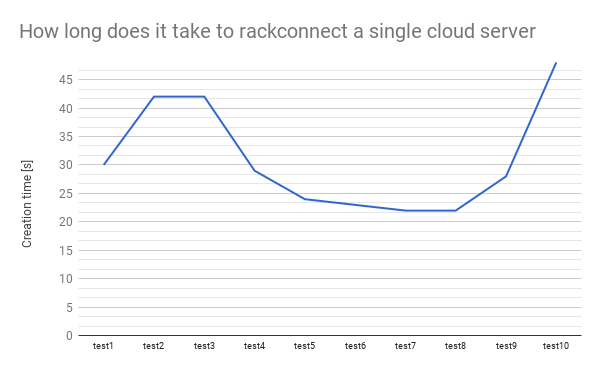
    1,      30,      42,      42,      29,      24,      23,      22,      22,      28,      48

A graphical representation of the above data.


Test case #2

 How long does it take to create 2 cloud severs and Rackconnect them.

As before the flowing test is going to simulate:
  • Using cloud API create 2 cloud servers
  • Monitor builds of the 2 cloud serves
  • Once any of the cloud servers is built start to monitor the Rackconnect (RC) build
  • Once the RC build is done save stats  and delete a cloud server
  • Generate stats when all 2 cloud servers are deleted
  • Repeat 10 times the above cycle
The logs below show how to start the test and the results.

$ python -u firstgen_cs_performance.py -v -t 10 -s 2 -b pass@bastion -u user -k key  run 2>&1 | tee log.$(date +%s).txt 
$ cat firstgen_rc_performance_report.1346020358.txt
Overall tests duration and statistics
test #,                          start,                            end, duration [s]
     1,     2012-08-26 22:43:00.756231,     2012-08-26 22:48:06.580328, 305
     2,     2012-08-26 22:48:06.580876,     2012-08-26 22:53:06.387345, 299
     3,     2012-08-26 22:53:06.388921,     2012-08-26 22:57:45.312555, 278
     4,     2012-08-26 22:57:45.313452,     2012-08-26 23:02:42.359540, 297
     5,     2012-08-26 23:02:42.361089,     2012-08-26 23:08:06.284967, 323
     6,     2012-08-26 23:08:06.286676,     2012-08-26 23:13:06.233792, 299
     7,     2012-08-26 23:13:06.235701,     2012-08-26 23:18:06.165773, 299
     8,     2012-08-26 23:18:06.166642,     2012-08-26 23:23:02.864452, 296
     9,     2012-08-26 23:23:02.865955,     2012-08-26 23:27:35.655586, 272
    10,     2012-08-26 23:27:35.662204,     2012-08-26 23:32:38.403999, 302

cloud building statistics
 cs #,   test1,   test2,   test3,   test4,   test5,   test6,   test7,   test8,   test9,  test10
    1,     216,     216,     216,     216,     186,     248,     247,     216,     216,     216
    2,     212,     213,     213,     212,     244,     213,     213,     213,     213,     213

rackconnect building statistics
 cs #,   test1,   test2,   test3,   test4,   test5,   test6,   test7,   test8,   test9,  test10
    1,      62,      44,      19,      69,      32,      46,      46,      68,      19,      69
    2,      55,      62,      55,      29,      51,      47,      40,      28,      50,      35

A graphical representation of the test #2 data.


Test case #3

How long does it take to create 3 cloud severs and Rackconnect them.

The logs below show how to start the test and the resulting statistics
 
$ python -u firstgen_cs_performance.py -v -t 10 -s 3 -b pass@bastion -u user -k key  run 2>&1 | tee log.$(date +%s).txt 
$ cat firstgen_rc_performance_report.1346023741.txt
Overall tests duration and statistics
test #,                          start,                            end, duration [s]
     1,     2012-08-26 23:36:24.625215,     2012-08-26 23:41:45.844673, 321
     2,     2012-08-26 23:41:45.846358,     2012-08-26 23:47:07.165236, 321
     3,     2012-08-26 23:47:07.166380,     2012-08-26 23:51:55.442095, 288
     4,     2012-08-26 23:51:55.443153,     2012-08-26 23:57:13.466668, 318
     5,     2012-08-26 23:57:13.468356,     2012-08-27 00:02:58.579180, 345
     6,     2012-08-27 00:02:58.580118,     2012-08-27 00:08:19.777111, 321
     7,     2012-08-27 00:08:19.778890,     2012-08-27 00:13:37.742591, 317
     8,     2012-08-27 00:13:37.744408,     2012-08-27 00:18:55.713891, 317
     9,     2012-08-27 00:18:55.715903,     2012-08-27 00:23:46.616462, 290
    10,     2012-08-27 00:23:46.617623,     2012-08-27 00:29:01.689222, 315

cloud building statistics
 cs #,   test1,   test2,   test3,   test4,   test5,   test6,   test7,   test8,   test9,  test10
    1,     220,     188,     219,     220,     219,     219,     219,     219,     220,     220
    2,     216,     215,     215,     216,     215,     215,     215,     247,     216,     216
    3,     212,     211,     212,     212,     211,     242,     242,     212,     212,     212

rackconnect building statistics
 cs #,   test1,   test2,   test3,   test4,   test5,   test6,   test7,   test8,   test9,  test10
    1,      35,      98,      17,      44,      93,      36,      38,      42,      15,      79
    2,      64,      36,      55,      81,      67,      58,      32,      40,      60,      25
    3,      87,      60,      57,      47,      39,      57,      52,      36,      56,      63

Like before these are the data visualised on graphs


Test case #4

How long does it take to create four cloud severs and Rackconnect them.

The logs below show how to start the test and results.

$ python -u firstgen_cs_performance.py -v -t 10 -s 4 -b pass@bastion -u user -k key  run 2>&1 | tee log.$(date +%s).txt 
$ cat firstgen_rc_performance_report.1346071307.txt 
Overall tests duration and statistics
test #,                          start,                            end, duration [s]
     1,     2012-08-27 12:42:58.464643,     2012-08-27 12:48:51.826041, 353
     2,     2012-08-27 12:48:51.827840,     2012-08-27 12:54:51.083906, 359
     3,     2012-08-27 12:54:51.085615,     2012-08-27 13:00:59.075276, 367
     4,     2012-08-27 13:00:59.076493,     2012-08-27 13:06:37.176187, 338
     5,     2012-08-27 13:06:37.177456,     2012-08-27 13:12:24.448441, 347
     6,     2012-08-27 13:12:24.449740,     2012-08-27 13:18:02.517695, 338
     7,     2012-08-27 13:18:02.519349,     2012-08-27 13:23:52.897831, 350
     8,     2012-08-27 13:23:52.898722,     2012-08-27 13:29:58.276944, 365
     9,     2012-08-27 13:29:58.278082,     2012-08-27 13:35:42.351643, 344
    10,     2012-08-27 13:35:42.352320,     2012-08-27 13:41:47.521873, 365

cloud building statistics
 cs #,   test1,   test2,   test3,   test4,   test5,   test6,   test7,   test8,   test9,  test10
    1,     224,     224,     224,     224,     224,     224,     192,     257,     195,     225
    2,     157,     222,     222,     221,     221,     222,     189,     222,     225,     254
    3,     249,     219,     250,     219,     218,     219,     217,     219,     221,     219
    4,     215,     216,     216,     216,     215,     216,     245,     248,     218,     216

rackconnect building statistics
 cs #,   test1,   test2,   test3,   test4,   test5,   test6,   test7,   test8,   test9,  test10
    1,      58,      62,      90,      91,      42,      48,      33,     100,      43,      82
    2,      59,      23,      71,      37,      93,      87,      63,      12,      89,      83
    3,      70,      41,      90,      40,      89,      81,     112,      44,      49,      21
    4,      61,     107,      45,      71,      84,      41,      55,      62,      94,      51

Like before these are the data visualised in a form of a graphs


Test case #5

How long does it take to create five cloud severs and Rackconnect them.

The logs below show how to start the test and results.

$ python -u firstgen_cs_performance.py -v -t 10 -s 5 -b pass@bastion -u user -k key  run 2>&1 | tee log.$(date +%s).txt 
cat firstgen_rc_performance_report.1346075296.txt
Overall tests duration and statistics
test #,                          start,                            end, duration [s]
     1,     2012-08-27 13:46:48.810109,     2012-08-27 13:53:00.032992, 371
     2,     2012-08-27 13:53:00.034355,     2012-08-27 13:59:41.839530, 401
     3,     2012-08-27 13:59:41.840434,     2012-08-27 14:05:53.244177, 371
     4,     2012-08-27 14:05:53.245105,     2012-08-27 14:11:55.703266, 362
     5,     2012-08-27 14:11:55.704239,     2012-08-27 14:18:19.149206, 383
     6,     2012-08-27 14:18:19.150468,     2012-08-27 14:24:33.617616, 374
     7,     2012-08-27 14:24:33.618816,     2012-08-27 14:30:51.220322, 377
     8,     2012-08-27 14:30:51.221913,     2012-08-27 14:36:53.563330, 362
     9,     2012-08-27 14:36:53.564169,     2012-08-27 14:42:31.914619, 338
    10,     2012-08-27 14:42:31.915871,     2012-08-27 14:48:16.481674, 344

cloud building statistics
 cs #,   test1,   test2,   test3,   test4,   test5,   test6,   test7,   test8,   test9,  test10
    1,     228,     228,     227,     194,     195,     228,     228,     227,     259,     228
    2,     225,     192,     225,     224,     256,     225,     226,     192,     192,     225
    3,     222,     222,     222,     222,     221,     223,     254,     222,     189,     223
    4,     220,     220,     250,     219,     218,     251,     188,     250,     217,     220
    5,     217,     217,     248,     246,     247,     215,     217,     216,     214,     217

rackconnect building statistics
 cs #,   test1,   test2,   test3,   test4,   test5,   test6,   test7,   test8,   test9,  test10
    1,      36,      54,      30,      44,      64,      30,      61,      48,      43,      44
    2,      52,      56,      54,     103,      97,      80,      50,      43,      51,      67
    3,      97,     166,      58,      42,      93,      68,      90,      52,      58,      69
    4,     114,      42,      71,     101,      53,      89,      55,      65,      49,     100
    5,      67,      74,      88,      73,      60,      80,      93,     113,     101,      67
Like before these are the data visualised in a form of a graph


Summary and results description

Through all the 5 test cases above we have been creating cloud servers and repeating this process 10 times. The graphs show that the numbers are changing and the visible trend is that the times are increasing.

We take a look at each of the 5 test cases again and summarize the 10 repetitions to a 3 number result: min, max and average Rackconnect build time. Next we can summarize all the 5 tests/50 cloud build tests and represent all the data in a single graph. The graph below compares all above tests.


As an example, for the test 1 we have the min, max and average times. It has been calculated base on the results from the Test Case #1. We did the some for the other Test Cases.

We see that every time we increase a number of cloud server to build by one the rackconnect build time increases as well. It means that if we burst 1, 2 and up to 5 cloud servers in one single test the time needed for the cloud infrastructure to provision and than to finish up and RackConnect a single cloud server increases as well.

References
  1. https://github.com/rtomaszewski/cloud-performance/tree/nextgenv1.0
  2. https://github.com/rtomaszewski/cloud-performance/blob/nextgenv1.0/check_rackconnect.sh
  3. http://www.rackspace.com/cloud/hybrid/

Friday, August 24, 2012

How long does it take to rackconnect a newly built cloud server

Update:
There is a more comprehensive comparison and listing of available resources for the topic:
Rackconnect load and performance tests

Rackconnect is a Rackspace cloud product that allows you to create a secure environment where  cloud servers can communicate with your dedicated hardware and vice versa. In the current version of Rackconnect and Rackspace tools you can observe and monitor the progress in Myrackspace portal. It gives you a good visibility what task need to be done and what the progress is. This article describes this this a little better: How to check or monitor build status of a cloud server that belong to a RackConnect cloud account

Problem

After a cloud server is fully created and built how long does it take on average to execute all the Rackconnect tasks?

Analysis

In my attempt to answer the question I wrote a python script [1]. The script is capable of doing a lot more than what is described below (for more info please take a look at the github [1] and other blog entries here). With the help of this script I repetitively run a simple test, collect data and summarized it here.

All test has been performed on a Rackconnect account using Cisco ASA 5505 and core cloud account.

Test case for Rackconnect build
  • Using the cloud API create a cloud server. 
  • Using a pooling mechanism every 30 seconds send a 'check' API request to confirm if the cloud built is complete.
  • Once the cloud is built use a pooling again and ever 20 seconds try to verify if all Rackconnect tasks are completed against the cloud server.
  • Generate summary and report.
Starting a test


$ for i in $(seq 1 7); do 
  python -u firstgen_cs_performance.py -v -t 1 -s 1 -b pass@bastion_ip -u user -k key run 2>&1 | tee log.$(date +%s).txt
done

The test will generate a log file for each test. These simple bash aliases will help you to parse the data [2].

Example output from the test

[ ][ ] Preparing to start all 1 tests
[ ][ ] test nr 1 started at 2012-08-23 22:45:23.631241
[ 1][  ] starting test nr 1, creating 1 cloud server, please wait ...
[ 1][ 1] created image: {'flavor': 1, 'image': 112, 'name': 'csperform1345758323'}
[ 1][ 1] cloud server build [csperform1345758323] created in 214.059273 seconds / 3.56765455 minutes
[ 1][ 1] rackconnect build [csperform1345758323] finished in 46.875914 seconds / 0.781265233333 minutes
[ ][ ] test nr 1 finished at 2012-08-23 22:49:50.318006

[ ][ ] Preparing to start all 1 tests
[ ][ ] test nr 1 started at 2012-08-23 22:49:51.105979
[ 1][  ] starting test nr 1, creating 1 cloud server, please wait ...
[ 1][ 1] created image: {'flavor': 1, 'image': 112, 'name': 'csperform1345758591'}
[ 1][ 1] cloud server build [csperform1345758591] created in 213.882997 seconds / 3.56471661667 minutes
[ 1][ 1] rackconnect build [csperform1345758591] finished in 41.747438 seconds / 0.695790633333 minutes
[ ][ ] test nr 1 finished at 2012-08-23 22:54:14.590053

[ ][ ] Preparing to start all 1 tests
[ ][ ] test nr 1 started at 2012-08-23 22:54:15.326702
[ 1][  ] starting test nr 1, creating 1 cloud server, please wait ...
[ 1][ 1] created image: {'flavor': 1, 'image': 112, 'name': 'csperform1345758855'}
[ 1][ 1] cloud server build [csperform1345758855] created in 213.884405 seconds / 3.56474008333 minutes
[ 1][ 1] rackconnect build [csperform1345758855] ERROR, couldn't find server or timeout after 1008.921862 seconds / 16.8153643667 minutes
[ ][ ] test nr 1 finished at 2012-08-23 23:14:39.879807

[ ][ ] Preparing to start all 1 tests
[ ][ ] test nr 1 started at 2012-08-23 23:33:54.517918
[ 1][  ] starting test nr 1, creating 1 cloud server, please wait ...
[ 1][ 1] created image: {'flavor': 1, 'image': 112, 'name': 'csperform1345761234'}
[ 1][ 1] cloud server build [csperform1345761234] created in 214.204459 seconds / 3.57007431667 minutes
[ 1][ 1] rackconnect build [csperform1345761234] finished in 13.489741 seconds / 0.224829016667 minutes
[ ][ ] test nr 1 finished at 2012-08-23 23:37:53.865203

[ ][ ] Preparing to start all 1 tests
[ ][ ] test nr 1 started at 2012-08-23 23:37:54.768286
[ 1][  ] starting test nr 1, creating 1 cloud server, please wait ...
[ 1][ 1] created image: {'flavor': 1, 'image': 112, 'name': 'csperform1345761474'}
[ 1][ 1] cloud server build [csperform1345761474] created in 213.867189 seconds / 3.56445315 minutes
[ 1][ 1] rackconnect build [csperform1345761474] finished in 41.842998 seconds / 0.6973833 minutes
[ ][ ] test nr 1 finished at 2012-08-23 23:42:18.215062

[ ][ ] Preparing to start all 1 tests
[ ][ ] test nr 1 started at 2012-08-23 23:47:07.441398
[ 1][  ] starting test nr 1, creating 1 cloud server, please wait ...
[ 1][ 1] created image: {'flavor': 1, 'image': 112, 'name': 'csperform1345762027'}
[ 1][ 1] cloud server build [csperform1345762027] created in 214.401686 seconds / 3.57336143333 minutes
[ 1][ 1] rackconnect build [csperform1345762027] finished in 88.597479 seconds / 1.47662465 minutes
[ ][ ] test nr 1 finished at 2012-08-23 23:52:16.013129

Results discussion

Firstly all the information about how long it took to build a cloud server or Rackconnect it have a measurement error appropriately of 30 or 20 seconds. But even with this relatively big numbers we can clearly see a pattern that:

  1. It is possible to Rackconnect a server in 13s (*) 
  2. Many Rackconnect builds were finished in about 41-46s
  3. In extreme case a cloud server build finished in 3,5 minute but the Rackconnect was still ongoing after 16min.

Add1.
This value is acceptable and correct even though the mesurement error for rackconnect task is 20s. The reason is that the script  firstgen_cs_performance.py uses different threads to perform various tasks. The 20s is simply a delay between the API calls performed by a single thread. For more info please take a look at the evaluate_rackconnect_status(self, test_nr) function.

References
  1. https://github.com/rtomaszewski/cloud-performance/blob/master/firstgen_cs_performance.py
  2. https://github.com/rtomaszewski/cloud-performance/blob/master/myaliases.sh

Monday, August 13, 2012

Rackspace Cloud server API performance analisis for cloud server bursting

In the cloud world the public cloud API allows us to create cloud servers that can differ in size. A current list of available flavors (combination of a RAM sizes and disk space) for the FirstGen Rackspace cloud is:

$ /usr/bin/cloudservers --username $FG_OS_USERNAME --apikey $FG_OS_PASSWORD  flavor-list
+----+---------------+-------+------+
| ID |      Name     |  RAM  | Disk |
+----+---------------+-------+------+
| 1  |   256 server  |  256  |  10  |
| 2  |   512 server  |  512  |  20  |
| 3  |   1GB server  |  1024 |  40  |
| 4  |   2GB server  |  2048 |  80  |
| 5  |   4GB server  |  4096 | 160  |
| 6  |   8GB server  |  8192 | 320  |
| 7  | 15.5GB server | 15872 | 620  |
| 8  |  30GB server  | 30720 | 1200 |
+----+---------------+-------+------+

Problem

A performance can be measured in many different ways. When working with the API I start asking my self recently these questions. As I couldn't fine definitive answer I decided to perform some testing to get a better feeling what you can expect.
  1. How long does it take to create XYZ identical cloud servers and get access to them (XYZ can vary from 4 to 100)
  2. Is there any performance degradation to expect when we want to create a high number of cloud servers on demand in a short amount of time
  3. Does the cloud server size affects the time needed to create a single server
  4. Does the cloud server size has to be taken into consideration when we perform cloud bursting? 
  5. What is a cloud server build failure rate when performing cloud busting?

Analysis

I have run a number of tests to determine and to find out more information about the performance when doing cloud bursting. The tests were relatively simple but they still give us a good overview.

Single test case description
 - Create XYZ cloud servers as quickly as possible (for big numbers we need to watch for the API limits and introduce artificial delays).
 - Using API pooling try to verify if the build is complete. How long does it take.
 - Save logs for offline review and and generate build statistics.
 - Measure how long the overall test takes.

For different cloud flavor I simulate different cloud bursting scenarios. All the tests were tailored and limited to the maximal of 150GB amount of RAM to use. The tests were run sequentialy one after another with a small gap of about 2-10min between them (logs overview and results collection)

 simulate test#1 -s 100 -f 1  # build 100 cloud servers, using 256MB instance
 simulate test#2 -s 50  -f 2  
 simulate test#3 -s 50  -f 3  
 simulate test#4 -s 50  -f 4
 simulate test#5 -s 50  -f 5
 simulate test#6 -s 18  -f 6 
 simulate test#7 -s 9   -f 7
 simulate test#8 -s 4   -f 8


Results


Each tests has a different color. A single dot represent a whole time needed to start a build for a single cloud server and then checking a status until it is ready to be use.

The table below shows a whole time for running a single test.

burstingFlavor RAMFlavor Idtest starttest endduration [m]errors
100256103:28:27 PM04:11:35 PM43:08.100
50512208:33:23 PM08:56:02 PM22:39.121
501024309:09:55 PM09:32:04 PM22:09.251
502048409:46:14 PM10:02:41 PM16:26.501
504096510:22:21 PM10:35:05 PM12:43.3012
188192611:06:48 PM11:14:28 PM07:39.870
915872711:16:23 PM11:23:38 PM07:15.350
430720811:35:33 PM11:46:27 PM10:53.721


Having these results above I can say that:

1. In average it takes from 300 to 500 seconds to create a cloud server. The only exception is when you try to build the biggest one with 30GB of RAM that can take up to 600s and more.

2. The API limitation for creating servers are directly influencing the results. The burst test for 256MB instances took 43 minutes to complete. The create time for a single cloud server were from min 250 to almost 500 seconds.

3. Base on the tests we don't see any significant build performance degradation pattern. It is somehow expected result as when the cloud servers are built they are built on different hypervisors in different zones (huddles). This means that as long there are enough free resources in the data center the builds should be fine.

4. In average the build time for different flavors is similar. In every test there were min and maximum times. The more cloud servers we build during the burst the more the distribution varies. We need to keep in mind that the number of cloud servers to build were not the some.

5. Although all the build times are between min 250 and 500 max (exception is the 30GB cloud server) it is visible that bigger instances require more time to build. Interestingly in a single test the graph shows that as we progress and create more and more cloud servers the build time decreases fist and then later spikes up. This pattern can be clearly observed for the 256MB instances.

6. The results for the 4GB instances are not fully correct. It has to be noted that the errors in table were a result of the hard API limitations we run into. The test cloud account had a limit of about 150GB of RAM that we could consume.

7. With this in mind the build failure rates were minimal or none for all tests. It is important to note that the errors are actually timeout issues only. In every test we were waiting about for 10min maximum for a cloud server to be up and running. Only 3 test produced cloud servers that were not accessible in 10 min. I believe that if we had waited longer these servers would be built successfully.

References

1. http://searchcloudcomputing.techtarget.com/definition/cloud-bursting

Tuesday, August 7, 2012

Basic tutorial on how to use and debug Cloud API for the NextGene (Openstack based) or FirsGen (build by Mosso) Rackspace cloud infrastructure

Before we start writing code and play with API we have to install the necessary python libraries first. I used the Ubuntu 11.04 for my testing.

Tools installation
  • Openstack API library
There is a packet with the Openstack libraries in repositories unfortunately this is not the latest code that is compatible with the NextGen Rackspace cloud release. We have to install the tools manually as described here [1].

# don't do this i Ubuntu 11.04 because it is based on older version of the library 
# and will not work
aptitude install python-novaclient

aptitude install python-setuptools
easy_install pip
pip install python-novaclient
pip install --upgrade  python-novaclient

# To verify that the files were installed 
find /usr -name novaclient
/usr/share/pyshared/novaclient
/usr/local/lib/python2.7/dist-packages/novaclient
  • FirstGen
# to install the library
aptitude install python-rackspace-cloudservers

# to verify where the files were installed
find /usr -name cloudservers
/usr/share/pyshared/cloudservers
/usr/lib/pymodules/python2.7/cloudservers

Debugging Nova Openstack API

 As Rackspace lunched his cloud first in the USA and Europe is following a few weeks later the URL below is for a US base cloud account. More about the URLs can be found here [2].

nova_example.py

# cat nova_example.py 
import httplib2
httplib2.debuglevel = 1

OS_USERNAME="user"
OS_PASSWORD="api"
OS_AUTH_URL="https://identity.api.rackspacecloud.com/v2.0/"

from novaclient.v1_1 import client
nt=client.Client(OS_USERNAME,OS_PASSWORD,'',OS_AUTH_URL)
nt.flavors.list()

You can than run this like python -i nova_example.py or run python and copy the code into it like that:

$ python -u
>>> import httplib2
>>> httplib2.debuglevel = 1
>>> 
>>> OS_USERNAME="user"
>>> OS_PASSWORD="api"
>>> OS_AUTH_URL="https://identity.api.rackspacecloud.com/v2.0/"
>>> 
>>> from novaclient.v1_1 import client
>>> nt=client.Client(OS_USERNAME,OS_PASSWORD,'',OS_AUTH_URL)
>>> nt.flavors.list()
connect: (dfw.servers.api.rackspacecloud.com, 443)
send: 'GET /v2/672114/flavors/detail HTTP/1.1\r\nHost: dfw.servers.api.rackspacecloud.com\r\nx-auth-token: mytoken\r\naccept-encoding: gzip, deflate\r\naccept: application/json\r\nuser-agent: python-novaclient\r\n\r\n'
reply: 'HTTP/1.1 200 OK\r\n'
header: Date: Tue, 07 Aug 2012 21:16:28 GMT
header: Content-Length: 2448
header: Content-Type: application/json
header: X-Compute-Request-Id: req-4e7dda9c-7eee-402f-acc8-b98dc08e21b5
header: Server: Jetty(8.0.y.z-SNAPSHOT)
[Flavor: 512MB Standard Instance, Flavor: 1GB Standard Instance, Flavor: 2GB Standard Instance, Flavor: 4GB Standard Instance, Flavor: 8GB Standard Instance, Flavor: 15GB Standard Instance, Flavor: 30GB Standard Instance]

Debugging FirstGen API

firstgen_example.py

# cat  firstgen_example.py
import httplib2
httplib2.debuglevel = 1

u='user'
k='api'

from cloudservers import CloudServers
cs=CloudServers(u,k)
cs.flavors.list()

An example output

$ python -u
>>> import httplib2
>>> httplib2.debuglevel = 1
>>>
>>> from cloudservers import CloudServers
>>> u='user'
>>> k='api'
>>> cs=CloudServers(u,k)
>>> cs.flavors.list()
connect: (lon.auth.api.rackspacecloud.com, 443)
send: 'GET /v1.0 HTTP/1.1\r\nHost: lon.auth.api.rackspacecloud.com\r\nx-auth-key: key\r\naccept-encoding: gzip, deflate\r\nx-auth-user: hugoalmeidauk\r\nuser-agent: python-cloudservers/1.0a1\r\n\r\n'
reply: 'HTTP/1.1 204 No Content\r\n'
header: Server: Apache/2.2.3 (Red Hat)
header: vary: X-Auth-User,X-Auth-Key,X-Storage-User,X-Storage-Pass
header: X-Storage-Url: https://storage101.lon3.clouddrive.com/v1/MossoCloudFS_c99f3ebf-f27d-4933-94b7-9e9ebf2bc7cd
header: Cache-Control: s-maxage=60806
header: Content-Type: text/xml
header: Date: Tue, 07 Aug 2012 21:19:36 GMT
header: X-Auth-Token: token
header: X-Storage-Token: token2
header: X-Server-Management-Url: https://lon.servers.api.rackspacecloud.com/v1.0/10001641
header: Connection: Keep-Alive
header: X-CDN-Management-Url: https://cdn3.clouddrive.com/v1/MossoCloudFS_c99f3ebf-f27d-4933-94b7-9e9ebf2bc7cd
header: Content-Length: 0
connect: (lon.servers.api.rackspacecloud.com, 443)
send: 'GET /v1.0/10001641/flavors/detail?fresh HTTP/1.1\r\nHost: lon.servers.api.rackspacecloud.com\r\nx-auth-token: token\r\naccept-encoding: gzip, deflate\r\nuser-agent: python-cloudservers/1.0a1\r\n\r\n'
reply: 'HTTP/1.1 203 OK\r\n'
header: Server: Apache-Coyote/1.1
header: vary:  Accept, Accept-Encoding, X-Auth-Token
header: Content-Encoding: gzip
header: Vary: Accept-Encoding
header: Last-Modified: Tue, 21 Jun 2011 21:09:45 GMT
header: X-PURGE-KEY: /flavors
header: Cache-Control: s-maxage=1800
header: Content-Type: application/json
header: Content-Length: 175
header: Date: Tue, 07 Aug 2012 21:19:36 GMT
header: X-Varnish: 1664913388 1664913324
header: Age: 44
header: Via: 1.1 varnish
header: Connection: keep-alive
[Flavor: 256 server, Flavor: 512 server, Flavor: 1GB server, Flavor: 2GB server, Flavor: 4GB server, Flavor: 8GB server, Flavor: 15.5GB server, Flavor: 30GB server]

References
  1. http://docs.rackspace.com/servers/api/v2/cs-gettingstarted/content/section_gs_install_nova.html
  2. http://docs.rackspace.com/servers/api/v2/cs-gettingstarted/content/section_gs_auth.html
  3. http://pypi.python.org/pypi/python-novaclient
  4. https://github.com/openstack/python-novaclient
  5. http://www.rackspace.com/knowledge_center/article/cloud-servers-how-to-articles-other-resources

Sunday, August 5, 2012

What does the cloud API returns when a server build failed

Cloud is a very flexible solution that can be used to build resilient, highly available and self healing architectures. But it is important to understand that it is not unbreakable and the solution has to be able to deal with it.

As an example, once in a while you are going to see that the cloud API to created a server succeded but the server itself never came online because the build failed. On Rackspace cloud infrastructure this can be visible like this.

  • In the original Cloud Control Panel (CP / CCP)
https://lon.manage.rackspacecloud.com/CloudServers/ServerList.do 


  • In the new Cloud Control Panel (CP / CCP)
https://mycloud.rackspace.com/a/accoutname/# 


  • Cloud API
$ curl -v  -H 'x-auth-token: token' https://lon.servers.api.rackspacecloud.com/v1.0/10001641/servers/10204743?fresh | json_xs 
 GET /v1.0/10001641/servers/10204743?fresh HTTP/1.1
 User-Agent: curl/7.21.3 (i686-pc-linux-gnu) libcurl/7.21.3 OpenSSL/0.9.8o zlib/1.2.3.4 libidn/1.18
 Host: lon.servers.api.rackspacecloud.com
 Accept: */*
 x-auth-token: token
 
 HTTP/1.1 203 OK
 Server: Apache-Coyote/1.1
 vary:  Accept, Accept-Encoding, X-Auth-Token
 Last-Modified: Sun, 05 Aug 2012 01:58:58 GMT
 X-PURGE-KEY: /10001641/servers/10204743
 Cache-Control: s-maxage=1800
 Content-Type: application/json
 Content-Length: 238
 Date: Sun, 05 Aug 2012 11:19:24 GMT
 X-Varnish: 1664599762 1664599608
 Age: 50
 Via: 1.1 varnish
 Connection: keep-alive
{
   "server" : {
      "status" : "ERROR",
      "progress" : 0,
      "name" : "csperform1344130906",
      "imageId" : 112,
      "flavorId" : 1,
      "addresses" : {
         "private" : [
            "10.176.4.188"
         ],
         "public" : [
            "46.38.185.119"
         ]
      },
      "hostId" : "cb728dfc3549dc7c92fb4abcba89dd0a",
      "metadata" : {},
      "id" : 10204743
   }
}

Sunday, July 29, 2012

How to clean and delete multiple cloud servers after a failed test

The best think about open cloud API is that it is easy accessible and can be easily scripted around. For exmaple during one of my tests I created multiple cloud servers but my job failed and didn't delete them before the exception was thrownd.

Problem

How to extract cloud server names from the log file and how to delted all of them from the accout.

$ python performance-single-cs.py-t 1 -s 25 -u user -k key  run | tee log.$(date +%s).txt
$ cat log*.txt
[ 1][  ] starting test nr 1, creating 25 cloud server, please wait ...
[ 1][ 1] created image: {'flavor': 1, 'image': 112, 'name': 'test7945'}
[ 1][ 2] created image: {'flavor': 1, 'image': 112, 'name': 'test7948'}
[ 1][ 3] created image: {'flavor': 1, 'image': 112, 'name': 'test7951'}
[ 1][ 4] created image: {'flavor': 1, 'image': 112, 'name': 'test7954'}
[ 1][ 5] created image: {'flavor': 1, 'image': 112, 'name': 'test7958'}
[ 1][ 6] created image: {'flavor': 1, 'image': 112, 'name': 'test7961'}
[ 1][ 7] created image: {'flavor': 1, 'image': 112, 'name': 'test7965'}
[ 1][ 8] created image: {'flavor': 1, 'image': 112, 'name': 'test7969'}
[ 1][ 9] created image: {'flavor': 1, 'image': 112, 'name': 'test7972'}
[ 1][10] created image: {'flavor': 1, 'image': 112, 'name': 'test7976'}
[ 1][11] created image: {'flavor': 1, 'image': 112, 'name': 'test8050'}
[ 1][12] created image: {'flavor': 1, 'image': 112, 'name': 'test8054'}
[ 1][13] created image: {'flavor': 1, 'image': 112, 'name': 'test8059'}
[ 1][14] created image: {'flavor': 1, 'image': 112, 'name': 'test8063'}
[ 1][15] created image: {'flavor': 1, 'image': 112, 'name': 'test8068'}
[ 1][16] created image: {'flavor': 1, 'image': 112, 'name': 'test8072'}
[ 1][17] created image: {'flavor': 1, 'image': 112, 'name': 'test8077'}
[ 1][18] created image: {'flavor': 1, 'image': 112, 'name': 'test8082'}
[ 1][19] created image: {'flavor': 1, 'image': 112, 'name': 'test8086'}
[ 1][20] created image: {'flavor': 1, 'image': 112, 'name': 'test8091'}
[ 1][21] created image: {'flavor': 1, 'image': 112, 'name': 'test8117'}
[ 1][22] created image: {'flavor': 1, 'image': 112, 'name': 'test8192'}
[ 1][23] created image: {'flavor': 1, 'image': 112, 'name': 'test8197'}
[ 1][24] created image: {'flavor': 1, 'image': 112, 'name': 'test8202'}
[ 1][25] created image: {'flavor': 1, 'image': 112, 'name': 'test8208'}
[ 1][ 1] cloud server build [test7945] created in 298.427304 seconds / 4.9737884 minutes
[ 1][ 2] cloud server build [test7948] created in 298.331735 seconds / 4.97219558333 minutes
[ 1][ 3] cloud server build [test7951] created in 298.268271 seconds / 4.97113785 minutes
[ 1][ 4] cloud server build [test7954] created in 298.469954 seconds / 4.97449923333 minutes
[ 1][ 5] cloud server build [test7958] created in 298.202301 seconds / 4.97003835 minutes
[ 1][ 6] cloud server build [test7961] created in 297.702382 seconds / 4.96170636667 minutes
[ 1][ 7] cloud server build [test7965] created in 298.051012 seconds / 4.96751686667 minutes
[ 1][ 8] cloud server build [test7969] created in 297.3658 seconds / 4.95609666667 minutes
[ 1][ 9] cloud server build [test7972] created in 296.993362 seconds / 4.94988936667 minutes
[ 1][10] cloud server build [test7976] created in 296.810522 seconds / 4.94684203333 minutes
[ 1][11] cloud server build [test8050] created in 226.269396 seconds / 3.7711566 minutes
[ 1][12] cloud server build [test8054] created in 226.051247 seconds / 3.76752078333 minutes
[ 1][14] cloud server build [test8063] created in 225.04139 seconds / 3.75068983333 minutes
[ 1][15] cloud server build [test8068] created in 224.326799 seconds / 3.73877998333 minutes
[ 1][16] cloud server build [test8072] created in 223.051956 seconds / 3.7175326 minutes
[ 1][17] cloud server build [test8077] created in 221.830032 seconds / 3.6971672 minutes
[ 1][18] cloud server build [test8082] created in 219.514883 seconds / 3.65858138333 minutes
[ 1][19] cloud server build [test8086] created in 218.35139 seconds / 3.63918983333 minutes
[ 1][20] cloud server build [test8091] created in 216.172884 seconds / 3.6028814 minutes
[ 1][21] cloud server build [test8117] created in 193.915105 seconds / 3.23191841667 minutes
[ 1][13] cloud server build [test8059] created in 328.421036 seconds / 5.47368393333 minutes
[ 1][22] cloud server build [test8192] created in 197.893329 seconds / 3.29822215 minutes
[ 1][23] cloud server build [test8197] created in 196.71745 seconds / 3.27862416667 minutes
[ 1][24] cloud server build [test8202] created in 263.305984 seconds / 4.38843306667 minutes
[ 1][25] cloud server build [test8208] created in 260.425359 seconds / 4.34042265 minutes

Solution

For a single log file

$ cat log.*.txt | grep "image':" | cut -d':' -f5 | tr '}' ' ' | grep -v created > tmp
echo > 'set -x' >  delete-all-cs.sh
cat tmp | xargs -I cs_name echo 'cloudservers --username user --apikey key delete cs_name' >> delete-all-cs.sh
bash delete-all-cs.sh

When we have multiple log files

$ cat << END > aux_script.sh
cat $1 | grep "image':" | cut -d':' -f5 | tr '}' ' ' | grep -v created > tmp
cat tmp | xargs -I cs_name echo 'cloudservers --username user --apikey key delete cs_name' >> delete-all-cs.sh
END

$ for i in log.*.txt ; do echo $i; ./aux_script.sh $i;  done
$ bash -x delete-all-cs.sh

Summary and results discussion

The solution with 'xargs' works pretty well for relatively small number of servers to delete. As each cloud server is deleted in a single cloudserver run there is no parallelism involved.

An interesting solution could be built with a help of a parallel tool [3]. It could allow us to execute multiple commands in parallel and achieve a much better timing results. Of course to make it work we would have to take into consideration the API limitations and design some workarounds it.

References
  1. https://github.com/rtomaszewski/cloud-performance
  2. http://www.cyberciti.biz/faq/linux-unix-bsd-xargs-construct- argument-lists-utility/
  3. https://savannah.gnu.org/projects/parallel/