Update:
There is a more comprehensive comparison and listing of available resources for the topic:
Rackconnect load and performance tests
This post is a continuum of the previous one:
How long does it take to rackconnect a newly built cloud server
The data below has been generated with the same script [1] that has been specifically modified to generate necessary statistics.
The method used to measure a time for the Rackconnect build has been improved as well. With the new code we should get even better and more accurate results.
For the tests below the new measurement error should be around 7 seconds only. This has been mainly achieved with a modified script
check_rackconnect.sh [2].
In basic the new code uses heuristic base on the bastion host local time stamps as well as the time stamps from the
check_rackconnect.sh script. The final calculation of how long the Rackconenct build took is done later in
log_status3 function [1].
All tests below are executed on the same Rackconnect environment: Cisco ASA 5505 and core cloud account. Every built cloud server has a configuration: flavor 1 (256MB), image type 112 (Ubuntu 10.04).
Test case #1
How long does it take to create 1 cloud sever and Rackconnect it.
A test below will simulate:
- Using cloud API create one cloud server
- Monitor the cloud build
- Once the cloud server is built start to monitor Rackconnect (RC) build
- Once the RC build is done generate stats and delete the cloud server
- Repeat the above cycle 10 times
The logs below show how to start the test and the resulting statistics.
$ python -u performance-single-cs.py -v -t 10 -s 1 -b pass@bastion -u user -k key  run | tee log.$(date +%s).txt
$ cat firstgen_rc_performance_report.1346017811.txt
Overall tests duration and statistics
test #,                          start,                            end, duration [s]
     1,     2012-08-26 22:07:06.914565,     2012-08-26 22:11:30.591570, 263
     2,     2012-08-26 22:11:30.592652,     2012-08-26 22:16:00.184358, 269
     3,     2012-08-26 22:16:00.185239,     2012-08-26 22:20:29.710007, 269
     4,     2012-08-26 22:20:29.711945,     2012-08-26 22:24:53.598046, 263
     5,     2012-08-26 22:24:53.598958,     2012-08-26 22:29:41.288767, 287
     6,     2012-08-26 22:29:41.290309,     2012-08-26 22:33:40.750456, 239
     7,     2012-08-26 22:33:40.752308,     2012-08-26 22:37:40.368505, 239
     8,     2012-08-26 22:37:40.370067,     2012-08-26 22:41:39.680134, 239
     9,     2012-08-26 22:41:39.680827,     2012-08-26 22:46:03.081319, 263
    10,     2012-08-26 22:46:03.083230,     2012-08-26 22:50:11.637474, 248

cloud building statistics
 cs #,   test1,   test2,   test3,   test4,   test5,   test6,   test7,   test8,   test9,  test10
    1,     213,     213,     214,     214,     244,     213,     213,     213,     214,     183

rackconnect building statistics
 cs #,   test1,   test2,   test3,   test4,   test5,   test6,   test7,   test8,   test9,  test10
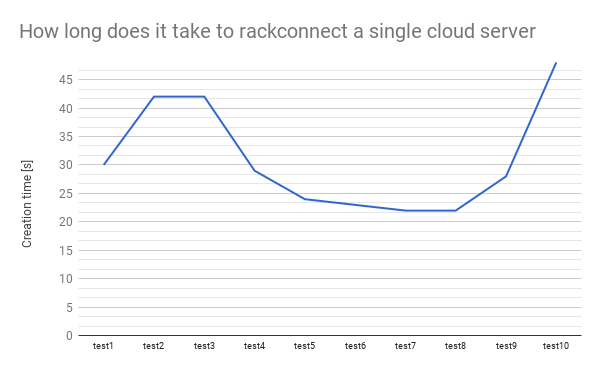
    1,      30,      42,      42,      29,      24,      23,      22,      22,      28,      48
A graphical representation of the above data.

 Test case #2
How long does it take to create 2 cloud severs and Rackconnect them.
As before the flowing test is going to simulate:
- Using cloud API create 2 cloud servers
- Monitor builds of the 2 cloud serves
- Once any of the cloud servers is built start to monitor the Rackconnect (RC) build
- Once the RC build is done save stats and delete a cloud server
- Generate stats when all 2 cloud servers are deleted
- Repeat 10 times the above cycle
The logs below show how to start the test and the results.
$ python -u firstgen_cs_performance.py -v -t 10 -s 2 -b pass@bastion -u user -k key  run 2>&1 | tee log.$(date +%s).txt
$ cat firstgen_rc_performance_report.1346020358.txt
Overall tests duration and statistics
test #,                          start,                            end, duration [s]
     1,     2012-08-26 22:43:00.756231,     2012-08-26 22:48:06.580328, 305
     2,     2012-08-26 22:48:06.580876,     2012-08-26 22:53:06.387345, 299
     3,     2012-08-26 22:53:06.388921,     2012-08-26 22:57:45.312555, 278
     4,     2012-08-26 22:57:45.313452,     2012-08-26 23:02:42.359540, 297
     5,     2012-08-26 23:02:42.361089,     2012-08-26 23:08:06.284967, 323
     6,     2012-08-26 23:08:06.286676,     2012-08-26 23:13:06.233792, 299
     7,     2012-08-26 23:13:06.235701,     2012-08-26 23:18:06.165773, 299
     8,     2012-08-26 23:18:06.166642,     2012-08-26 23:23:02.864452, 296
     9,     2012-08-26 23:23:02.865955,     2012-08-26 23:27:35.655586, 272
    10,     2012-08-26 23:27:35.662204,     2012-08-26 23:32:38.403999, 302

cloud building statistics
 cs #,   test1,   test2,   test3,   test4,   test5,   test6,   test7,   test8,   test9,  test10
    1,     216,     216,     216,     216,     186,     248,     247,     216,     216,     216
    2,     212,     213,     213,     212,     244,     213,     213,     213,     213,     213

rackconnect building statistics
 cs #,   test1,   test2,   test3,   test4,   test5,   test6,   test7,   test8,   test9,  test10
    1,      62,      44,      19,      69,      32,      46,      46,      68,      19,      69
    2,      55,      62,      55,      29,      51,      47,      40,      28,      50,      35
A graphical representation of the test #2 data.

 Test case #3
How long does it take to create 3 cloud severs and Rackconnect them.
The logs below show how to start the test and the resulting statistics
$ python -u firstgen_cs_performance.py -v -t 10 -s 3 -b pass@bastion -u user -k key  run 2>&1 | tee log.$(date +%s).txt
$ cat firstgen_rc_performance_report.1346023741.txt
Overall tests duration and statistics
test #,                          start,                            end, duration [s]
     1,     2012-08-26 23:36:24.625215,     2012-08-26 23:41:45.844673, 321
     2,     2012-08-26 23:41:45.846358,     2012-08-26 23:47:07.165236, 321
     3,     2012-08-26 23:47:07.166380,     2012-08-26 23:51:55.442095, 288
     4,     2012-08-26 23:51:55.443153,     2012-08-26 23:57:13.466668, 318
     5,     2012-08-26 23:57:13.468356,     2012-08-27 00:02:58.579180, 345
     6,     2012-08-27 00:02:58.580118,     2012-08-27 00:08:19.777111, 321
     7,     2012-08-27 00:08:19.778890,     2012-08-27 00:13:37.742591, 317
     8,     2012-08-27 00:13:37.744408,     2012-08-27 00:18:55.713891, 317
     9,     2012-08-27 00:18:55.715903,     2012-08-27 00:23:46.616462, 290
    10,     2012-08-27 00:23:46.617623,     2012-08-27 00:29:01.689222, 315

cloud building statistics
 cs #,   test1,   test2,   test3,   test4,   test5,   test6,   test7,   test8,   test9,  test10
    1,     220,     188,     219,     220,     219,     219,     219,     219,     220,     220
    2,     216,     215,     215,     216,     215,     215,     215,     247,     216,     216
    3,     212,     211,     212,     212,     211,     242,     242,     212,     212,     212

rackconnect building statistics
 cs #,   test1,   test2,   test3,   test4,   test5,   test6,   test7,   test8,   test9,  test10
    1,      35,      98,      17,      44,      93,      36,      38,      42,      15,      79
    2,      64,      36,      55,      81,      67,      58,      32,      40,      60,      25
    3,      87,      60,      57,      47,      39,      57,      52,      36,      56,      63
Like before these are the data visualised on graphs

 Test case #4
How long does it take to create four cloud severs and Rackconnect them.
The logs below show how to start the test and results.
$ python -u firstgen_cs_performance.py -v -t 10 -s 4 -b pass@bastion -u user -k key  run 2>&1 | tee log.$(date +%s).txt
$ cat firstgen_rc_performance_report.1346071307.txt
Overall tests duration and statistics
test #,                          start,                            end, duration [s]
     1,     2012-08-27 12:42:58.464643,     2012-08-27 12:48:51.826041, 353
     2,     2012-08-27 12:48:51.827840,     2012-08-27 12:54:51.083906, 359
     3,     2012-08-27 12:54:51.085615,     2012-08-27 13:00:59.075276, 367
     4,     2012-08-27 13:00:59.076493,     2012-08-27 13:06:37.176187, 338
     5,     2012-08-27 13:06:37.177456,     2012-08-27 13:12:24.448441, 347
     6,     2012-08-27 13:12:24.449740,     2012-08-27 13:18:02.517695, 338
     7,     2012-08-27 13:18:02.519349,     2012-08-27 13:23:52.897831, 350
     8,     2012-08-27 13:23:52.898722,     2012-08-27 13:29:58.276944, 365
     9,     2012-08-27 13:29:58.278082,     2012-08-27 13:35:42.351643, 344
    10,     2012-08-27 13:35:42.352320,     2012-08-27 13:41:47.521873, 365

cloud building statistics
 cs #,   test1,   test2,   test3,   test4,   test5,   test6,   test7,   test8,   test9,  test10
    1,     224,     224,     224,     224,     224,     224,     192,     257,     195,     225
    2,     157,     222,     222,     221,     221,     222,     189,     222,     225,     254
    3,     249,     219,     250,     219,     218,     219,     217,     219,     221,     219
    4,     215,     216,     216,     216,     215,     216,     245,     248,     218,     216

rackconnect building statistics
 cs #,   test1,   test2,   test3,   test4,   test5,   test6,   test7,   test8,   test9,  test10
    1,      58,      62,      90,      91,      42,      48,      33,     100,      43,      82
    2,      59,      23,      71,      37,      93,      87,      63,      12,      89,      83
    3,      70,      41,      90,      40,      89,      81,     112,      44,      49,      21
    4,      61,     107,      45,      71,      84,      41,      55,      62,      94,      51
Like before these are the data visualised in a form of a graphs

 Test case #5
How long does it take to create five cloud severs and Rackconnect them.
The logs below show how to start the test and results.
$ python -u firstgen_cs_performance.py -v -t 10 -s 5 -b pass@bastion -u user -k key  run 2>&1 | tee log.$(date +%s).txt
cat firstgen_rc_performance_report.1346075296.txt
Overall tests duration and statistics
test #,                          start,                            end, duration [s]
     1,     2012-08-27 13:46:48.810109,     2012-08-27 13:53:00.032992, 371
     2,     2012-08-27 13:53:00.034355,     2012-08-27 13:59:41.839530, 401
     3,     2012-08-27 13:59:41.840434,     2012-08-27 14:05:53.244177, 371
     4,     2012-08-27 14:05:53.245105,     2012-08-27 14:11:55.703266, 362
     5,     2012-08-27 14:11:55.704239,     2012-08-27 14:18:19.149206, 383
     6,     2012-08-27 14:18:19.150468,     2012-08-27 14:24:33.617616, 374
     7,     2012-08-27 14:24:33.618816,     2012-08-27 14:30:51.220322, 377
     8,     2012-08-27 14:30:51.221913,     2012-08-27 14:36:53.563330, 362
     9,     2012-08-27 14:36:53.564169,     2012-08-27 14:42:31.914619, 338
    10,     2012-08-27 14:42:31.915871,     2012-08-27 14:48:16.481674, 344

cloud building statistics
 cs #,   test1,   test2,   test3,   test4,   test5,   test6,   test7,   test8,   test9,  test10
    1,     228,     228,     227,     194,     195,     228,     228,     227,     259,     228
    2,     225,     192,     225,     224,     256,     225,     226,     192,     192,     225
    3,     222,     222,     222,     222,     221,     223,     254,     222,     189,     223
    4,     220,     220,     250,     219,     218,     251,     188,     250,     217,     220
    5,     217,     217,     248,     246,     247,     215,     217,     216,     214,     217

rackconnect building statistics
 cs #,   test1,   test2,   test3,   test4,   test5,   test6,   test7,   test8,   test9,  test10
    1,      36,      54,      30,      44,      64,      30,      61,      48,      43,      44
    2,      52,      56,      54,     103,      97,      80,      50,      43,      51,      67
    3,      97,     166,      58,      42,      93,      68,      90,      52,      58,      69
    4,     114,      42,      71,     101,      53,      89,      55,      65,      49,     100
    5,      67,      74,      88,      73,      60,      80,      93,     113,     101,      67
Like before these are the data visualised in a form of a graph


Summary and results description
Through all the 5 test cases above we have been creating cloud servers and repeating this process 10 times. The graphs show that the numbers are changing and the visible trend is that the times are increasing.
We take a look at each of the 5 test cases again and summarize the 10 repetitions to a 3 number result: min, max and average Rackconnect build time. Next we can summarize all the 5 tests/50 cloud build tests and represent all the data in a single graph. The graph below compares all above tests.

As an example, for the test 1 we have the min, max and average times. It has been calculated base on the results from the Test Case #1. We did the some for the other Test Cases.
We see that every time we increase a number of cloud server to build by one the rackconnect build time increases as well. It means that if we burst 1, 2 and up to 5 cloud servers in one single test the time needed for the cloud infrastructure to provision and than to finish up and RackConnect a single cloud server increases as well.
References
- https://github.com/rtomaszewski/cloud-performance/tree/nextgenv1.0
- https://github.com/rtomaszewski/cloud-performance/blob/nextgenv1.0/check_rackconnect.sh
- http://www.rackspace.com/cloud/hybrid/


 Posts
Posts


