Everyone speaks about SDN an the benefits its brings when deploying cloud or enterprise infrastructures. But do we actually know or have any understanding what this all SDN is about? If you want be fluent in the language of virtual networking and network overlays in modern data centers you need to understand at least the following concepts:
IEEE 802.1ad Provider Bridging or IEEE 802.1q Tunneling also known as IEEE 802.1QinQ or simply Q-in-Q
IEEE 802.1ah Provider Backbone Bridges (PBB) or Mac-in-Mac Tunnels
Cisco FabricPath allows multipath networking at Layer 2
TRILL - IETF Transparent Interconnection of Lots of Links is a Layer 2 multipathing technology
Shortest-Path Bridging (SPB) is defined in IEEE 802.1aq and is targeted as a replacement for Spanning Tree Protocol (example info based on Avaya documentation)
Cisco Overlay Transport Virtualization (OTV) is a Layer 2-over-Layer 3 encapsulation "MAC-in-IP" technology
The Cisco Location/Identifier Separation Protocol (LISP) is currently defined as a Layer 3 overlay scheme over a Layer 3 network
Multiprotocol Label Switching (MPLS)
Virtual Private LAN Service (VPLS) a Layer 2 tunneling protocols
Virtual Private Routed Network (VPRN) also known as BGP/MPLS or IP-VPN provides IP VPN services
Host-Based Overlay Networks
Virtual Extensible LAN (VXLAN) is a Layer 2 overlay scheme over a Layer 3 networ that uses IP/UDP encapsulation
Network Virtualization Using Generic Routing Encapsulation (NVGRE) allows creation of virtual Layer 2 topologies on top of a physical Layer 3 network
Stateless transport tunneling (STT) is an overlay encapsulation scheme over Layer 3 networks that use a TCP-like header
You can assemble a server from off the shelf components that will be able to sent and receive traffic in multi Gigabit speed. Here is an example of an 10Gps net card from Intel.
But can we turn this server into a high performance network appliance? Do we still need a dedicated hardware like for example ASIC, FPGA, low latency RAM and TCAM RAM in network devise so they can efficiently switch and forward packets with maximum wire speed.
Network processing unit (NPU) and new hardware design
The key points listed above still hold. But the next generation network appliances will be rather build with a help of a multicore generic NPU using the power of parallel processing than expensive and purposely design ASIC. With the right software (OS - often Linux, drivers, firmware, SDK, and API libraries) you will be able to turn a conventional x86 server with a modern PCIe data bus into a high performance, low latency and high speed network appliance.
Designing a network is a topic within itself and there is no way we can cover all of it in this single post. Cisco has its own certification path path CCDE for these who want to know more.
Cisco design and implementation guide - old best practices
In a very simplistic view back in the old days a network used to be design similar to the picture below (although it is hard to say when the new era started ;)). Every big network had to have a core, distribution(sometimes called aggregation) and access layer. The network was engineered mainly to help with North to South traffic in the data center or in another words to help get the data out and into the data center.
New cloud friendly data center design best practice
With the advent and popularization of new networking devises that support layer 2 routing, commonly know as networks fabrics (more info about TRILL and fabric) the network design has shifted in data centers. The way we design the networks today is to maximize the East to West traffic instead of the North to South ( old design above). The purpose of the new network is to allow more efficiently exchange data between the servers within the rack or data center.
They say that a picture is worth more than a thousand words. To help us to visualize how a new data center network/cloud network is designed these demonstration pictures (taken from Cisco document: Cisco Massively Salable Data Center) will shed some more light on it. Please note that we no longer use the core, distribution or access keyword but instead: spine, leaf or superspine to describe the different network layers :).
There are many vendors to chose from when selecting your hardware for a complete Openstack deployment (example list of data center friendly networking vendors to look at ). And to make it even more difficult you need to think about all spectrum of vendors like networking, storage and compute.
The data below are taken from the Cisco PDF white paper Red Hat Openstack Architecture on Cisco UCS platform from the DesignZone for Cloud Automation Solution section on Cisco site (http://www.cisco.com/c/en/us/solutions/enterprise/data-center-designs-cloud-computing/could_automation.html).
Openstack on Cisco UCS hardware platform
Cisco is no longer only a networking vendor. With the UCS they offer as well computer platform where you can put together a server with specific hard drive size, mount of RAM or type of CPU, interconnection card etc. An example configuration taken from the Cisco document above:
That means if we put togheter the UCS servers and the Cisco Nexus switches and Openstack software we can build a simple POC like this one:
In the white paper we can actually find a full list of hardware if you would like to build it yourself.
In my previous posts we took a look at how hardware networking vendors design and build modern systems. We concentrated mainly on the OS and software integration on the appliance:
It’s okay to leave the door unlocked - get net admin access to the underlying Linux operating system tools
Preserve the integrity of the Linux core - keep your product specific changes as small as possible to allow integration with already existing software out there
Focus on state, not messages - being only maybe an average programmer I will not comment on this as this is clearly not my area of expertise
Keep your hands out of the kernel - why to complicate your code if it doesn't bring any revolutionary benefit; besides it is much easier to find developers who know how to program in linux/libc than in Linux kernel.
Provide familiar interfaces to ease adoption - everyone knows the IOS CLI so why to invent something new.
Lesson learned from Arista: reuse, integrate and trust your customers.
The company success would not be possible without a clear and consistent OS and tools set design. From my experience they are the second company (I saw this first on BigIP - F5 load balancers).
Networking is a fascinating topic. There are thousands of books and RFC describing protocols from layer 1 to layer 7. In every big network we find variety of network devices that handle traffic and provide additional enhanced services. Example of such devices can be switches, routers, load balancers, traffic accelerators, firewalls, IDS, DDOS mitigation devices and others. Services could be QoS, security and traffic deduplication etc.
Looking at the network devices someone could ask one interesting questions: how to build a network device; how would you describe an internal device architecture?
Of course every company has its own patents, secrets, methods etc. how they built, manage and operate network appliances. Below are some information I found when working with them or reading about them.
Dell acquired Force10 in 2011 and that way gained access to data center networking technologies like 10 and 40 Gigabit Ethernet switches.
Like many hardware devices a network appliance needs an (network) operating system (NOS) to control resources and to provide monitoring and management interface. Base on the publicly available information a simplified view of a hardware and software architecture for Force10 network devices can be described as:
Packet processing is accelerated with the help of an modern ASIC chip(s)
There is a low level microcode/firmware ( operating system driver) to manage the ASIC
All of this is integrated within a Linux or *BSD (NetBSD) operating system
Did you see big systems implementations?
Did you participated in a system implementation or deployment?
What is your current role?
What is your carrier goal?
Every company is organised in a different way. Every company is build in a different way. But it all starts from a vision that is going to be mapped into an architecture. Once the concept or the first sketches of the architecture are established the implementation process is going to follow.
It is an example how it can look like. If you are interested in other options it is worth to take a look at some of the established (enterprise) architecture frameworks. Generally speaking, it is rather a quite difficult document to read as it tries to address the issue of an enterprise company. But even though its complexities it still gives a good overview how complex some processes, implementations or deployments can be. Below is a table from FEAF framework that list key roles and teams for an organisation.
This one below shows the concept of an architecture from a high level point of view.
The more detailed description of the architecture domains can be found here. Personally, I'm specializing in the area of technical infrastructure architecture. With the specialization in virtual networking and cloud network in IaaS cloud.
Technical architecture or infrastructure architecture: The structure and behaviour of the technology infrastructure. Covers the client and server nodes of the hardware configuration, the infrastructure applications that run on them, the infrastructure services they offer to applications, the protocols and networks that connect applications and nodes.
Arista belongs to the vendor elite list designing and building network equipment for the next generation of data centers to support cloud and virtual network workloads. What is cool about this vendor is it unique and open network operating system architecture: Arista EOS.
System architecture
It is built on top of a Linux Fedora distribution. From high level point of view it has a similar design architecture like BigIP LTM from F5 Networks (TMOS architecture link1/link2). The pictures below show architecture design for EOS.
Linux Bash access
As an engineer, after login you get access to the Linux Bash shell on Arista switch. From there you can run the switch CLI commands or get access to the whole list of Linux standard commands. You can run top to list processes, use ls -la to list files, less to see file content and most importantly run tcpdump to capture traffic. All good Linux staff and not some vendor custom magic tool set.
Configuration CLI
The CLI mirrors many of the Cisco commands:
Example : port mirroring
7050-1(config)#monitor session test1 ?
destination  Mirroring destination configuration commands
source       Mirroring source configuration commands

7050-1(config)#monitor session test1 source ?
Ethernet      Ethernet interface
Port-Channel  Lag interface

7050-1(config)#monitor session test1 source ethernet 1 ?
both  Configure mirroring in both transmit and receive directions
rx    Configure mirroring only in receive direction
tx    Configure mirroring only in transmit direction
,     extend list
-     specify range

7050-1(config)#monitor session test1 source ethernet 1
7050-1(config)#
Example : show port-channel
Arista:(config-if-Et1)#show port-channel 20 detail
Port Channel Port-Channel20:
 Active Ports:
 Port                Time became active       Protocol    Mode
 ------------------- ------------------------ -------------- ------
 Ethernet1           14:53:02                 LACP        Active
Ethernet2          14:52:57                 LACP        Active
Example : capturing network data
tcpdump -i et12 -vvv > /tmp/tcpdumpe12.txt
Extensions
As the system provide Python execution environment you can easily customize it and write your own extension. An example of a Python script for gateway monitoring can be found here: Dead Gateway Detection.
Additional network overlay is the foundation and building block for most modern cloud network architectures today. In practice it means that before we can even think how to architect and build network for the cloud we need to build a solid and reliable multi-tiered IP network topology to interconnect our hypervisors servers. Of course this is a big simplification and there are many vendors that provide hardware support for cloud network (SDN enabled network). Examples are Brocade VCS/MLX or Cisco Nexus platform/Random thoughts about Cisco nexus product line.
But what is important is that in essence what we are going to built will be a typical multi-tier network with access, distribution and core layers like this example below:
Once the network is built there is now time for the cloud network element to be added. This is again very simplistic view to avoid all the technical details.
The industry is still working to established a common ground and consensus how a cloud network should look like and what services it should provide but in practice (base on a few companies like Nicira or Midokura) it is tightly associated with Software defined networking (SDN) concept and architecture. And the common practice today is to implement SDN network as an additional network overlay on top of IP fabric infrastructure.
Like every network, cloud network needs to provide IP connectivity for cloud resources (cloud servers for example). Often to achieve this al hypervisors are inter-connected using tunneling protocols. This model allow us to decouple the cloud network from the physical one and allow more flexibility. That way all VMs traffic is going to be routed within the tunnels. To solve the cloud network problem is to find a solution how to route between the hypervisors using the tunnels.
As tunnels require additional resources there is an open question what overhead, resource consumption and performance implication will they represent. This post: The Overhead of Software Tunneling(*), do a comparison and tries to shed some more light on the topic.
Throughput
Recv side cpu
Send side cpu
Linux Bridge:
9.3 Gbps
85%
75%
OVS Bridge:
9.4 Gbps
82%
70%
OVS-STT:
9.5 Gbps
70%
70%
OVS-GRE:
2.3 Gbps
75%
97%
This next table shows the aggregate throughput of two hypervisors with 4 VMs each.
Throughput
CPU
OVS Bridge:
18.4 Gbps
150%
OVS-STT:
18.5 Gbps
120%
OVS-GRE:
2.3 Gbps
150%
We can see that not all tunnels are completely transparent when it comes to performance. The GRE tunnel shows a significant degradation in throughput. The TCP based STT tunnel works fine although For a complete analysis, explanation and further discussion I recommend to read the blog above (*).
By reading about various companies like (Nicira, Midokura) that provide SDN solutions you hear various technology acronyms like Openflow, Openvswitch and others. After a while once you allow this knowledge to sink your appetite grows and you begin to ask more questions like:
How did they create this
What tread off and compromises exist in the architecture
What could be the limitations
How complex is the architecture and deployment
What software, languages etc.. did they use
How much operational intensive it is to support this
It is hard and even impossible to answer all of them fully but I hope the little info below will help to fill some of the gaps.
Vendor advertised information
There is no much info about internal architecture or deployment options on the vendor's home site. We can find only very generic descriptions like the ones below.
Nicira [1]
What is Nicira's architecture? Nicira's Distributed Virtual Network Infrastructure (DVNI) is an architecture that builds on a distributed software system that decouples virtual services from the network hardware and works with any server hypervisor.
How does the platform work? The NVP Controller Cluster dynamically updates the state of tunnel connections between OVS switches through the physical network. These tunnels allow virtual networks to span across the data center, even between data centers. Data communications between workloads connected to virtual networks is encapsulated and traverses the physical network, enabling VM mobility across subnet boundaries, while maintaining L2 adjacency. The operational state of the network is computed algorithmically in the NVP Controller Cluster,
Midokura [2]
Fully Distributed Architecture with no single points of failure Midokura has built MidoNet to be completely distributed and scalable. These advantages are key in building your infrastructure. Furthermore, MidoNet is a completely distributed scale-out system, offering no single point of failure.
Architecture differences
But there is one thing that can be read between the lines. Although both vendors claim to offer SDN solution that is based on a distributed architecture is seems they interpret this in a different way.
It looks like that for Nicira the distributed attribute is mainly a property of its NVP cluster. NVP is a central place that holds all network (like flows, port, tenants, network ...) related information that is relevant to implement a control plane.
For Midokura the distributed attribute is a way they designed the whole solution they have. There is no single central component (in a form of a single or multi-server distributed cluster) that holds and manages all network information. It looks like that every Midonet node has limited knowledge but in the same time has enough information to perform tasks done normally by the control plane.
Comparison of the architecture types
Depending on the architecture type both companies facing different challenges that they need to solved. An interesting summary of types and problems that you may encounter can be found in this wiki article SDN deployment models. The article list following types that matching quite well above descriptions that should give us enough info to realize how different are both approaches:
There is Openstack that aims to provide opensource IaaS solution for the Internet. But cloud has many faces and in a simplistic cloud taxonomy we can speak of IaaS, PaaS and SaaS as the main trends in the industry.
The video below provide a short introduction and comparison of Openstack and Appfog that is based on CloudFoundry. Both products embracing the open source developed paradigm. Both try to define standard and become leader in the respective domain.
As a bonus material for these who are interested in the overall technical system architecture this link provide slides and video of Derek Collison (a lead technical architect for CloudFondry at Vmware) Cloud Foundry: Inside the Machine
Demonstration and example
You need to create a basic account that is free (but has resource limitation)
On the GUI we can quickly and easily increase the number of instance. Once new instance is spun up and application code is cloned to it we see the changes on the CLI as well.
Anycast architecture that helps to create and achieve HA
To run efficiently applications demands more and more resources. Even with the right amount of computational resources like servers, CPU, RAM, storage for them to be considered efficient and successfully on the market they have to meet many more requirements. It is impossible to list here all of them as they can depend on internal factors (for example driven by the application architecture itself ) or relay on external factors that may be specific and unique to a customer and an environment.
Although in this short blog post, I would like to discuss the importance of scalability factor and show one patters that can be used to build a highly available and efficient infrastructure systems.
There are two concept how we can try to implement a scalability: scale up vs scale out. For more information about scale up (or vertical scaling) these links provide further information [1]. We will concentrate here only on the scale out option. All the pictures below are base on this presentation that slides can be found here:
OpenStack-Design-Summit-HA-Pairs-Are-Not-The-Only-Answer.
To fully benefit from the HA pattern your application architecture should relay use share nothing paradigm
That way if failure occurs only an isolated, small part of the computational resources will be impacted.
Next we have to configure our routers and implementing necessary changes for a routing protocol.
OSPF routing protocols is an examples and others can be used in similar way as well. For more info can be found here [4].
The slides show only a fraction of the configuration. Another good example with con figs can be found here: Anycast DNS - Part 4, Using OSPF
As last you have to configure you servers to listen and accept traffic for our anycast IP.
A best practice is to configure the external IP on the loopback interface, disable ARP protocols for it and bind our application specifically to this IP.
The Folsom Openstack release brings many enhancements to networking stack in the Openstack version of the cloud. The features have been encapsulated with in a new core project called Quantum. But even looking at the documentation it can be very difficult at the beginning to understand what are the differences to old nova-network solution and how an example Quantum virtual network can be configured.
Fortunately there is an easy to follow video introduction to Quantum from last Summit [1]. The slides to it can be found here as well [2].
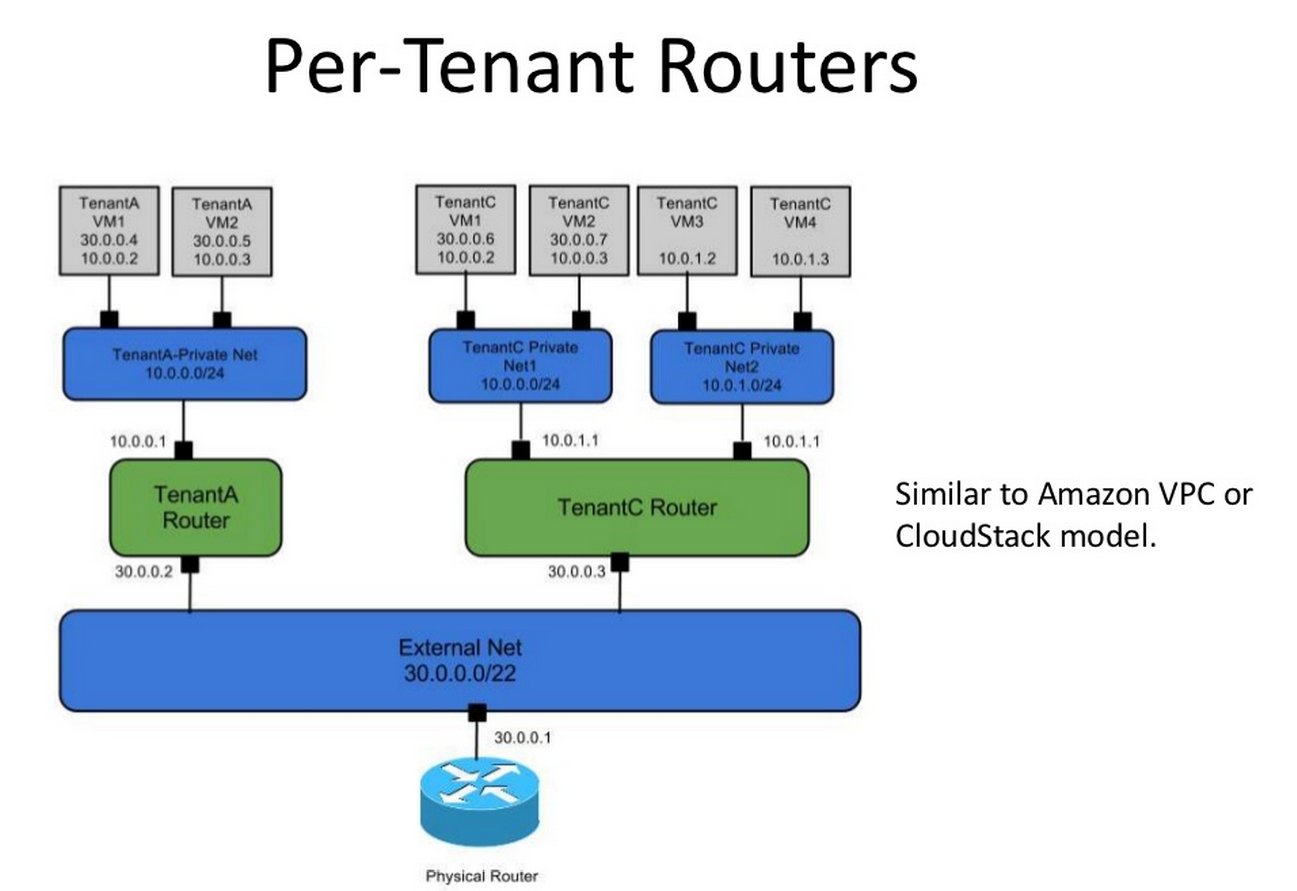
Below are example slides from the presentation of how a virtual network can be build and how it can look like in cloud powered by Openstack, examples: single flat network, multiple flat networks, mixed flat plus private networks, single provider network, multiple per tenant private networks plus single provider network.
This is an overwhelming task of tracking code changes for Openstack projects as well as to maintain an up to date view of current software architecture model. As the number of core Openstack projects increase it drives as well as the overall complexity and communication patters between the them.
Below is a nice diagram that through visualization helps to represent the complexities and simplify the communications view between all components in Folscom Openstack release.
I have found this youtube video [1] on the the Puppet channel. It is an interesting presentation about
the day to day issues the folks from Redhat run into when developing, managing and deploying new code for customer facing sites they host.
On of the things they mention that was difficult for them and why the started this project were:
Lack of a cross functional team who could understand the whole architecture.
People tend to have a limited understanding of other areas that they don't work in; Examples are SysAdmin about NetAdmin, NetAdmin about Develpers etc.
On new depoyment a difficulties to find a team/person who can take an ownership of an issue as the problem may be above the area of their own expertise.
Diverse and inconsistencies dev, staging and production systems.
To solve the problem they decided to refactor the architecture and automate as much as it was possible. The video [1] shows what issues they run into and how they solved it with a help of Puppet module they created and the F5 load balancer.
In short a message they convey in the presentation is: automate, standardize, and automate once again. References
Every now and than there is a shift and change in IT industry. The changes try to provide a solution to our old problems and try to as well as predict and introduce new ideas. Many times it is not only a change in hardware itself or a change in software only but a mixture of both.
The Cloud is today the buzz word that drives the changes and powers the transformation. In my attempts to embrace and understand what it is I have found couple if videos on YouTube that give us a very nice inside view into the cloud what it is, how this works and what ideas it brings with.
Profile: Curious systems engineer interested in many of the IT technologies but especially in cloud systems and network engineering. A quick learner who likes to tinker and who often spent time researching and trying new technologies for personal and business benefit.
Especially interested in: cloud, openstack, network, cloud network, systems architecture, programming, distributed computing, web, clustering, ha, replication, load balancing, virtualization, automation, scalability
Please note that the code available here is only for demonstration purposes. If you want to be serious, you'll have to make it more robust and integrate it. Also, the description is by no means a definitive reference on any of the subjects, but rather the result of my experimentation. Feel free to report any bugs or errors you find in the code or otherwise in the articles. Thanks




 Posts
Posts


